Changelog
Learn what's new, updated, fixed and new features we've released!
July 15, 2026: Project Workspace 2.0
July 15, 2026

We have released a major update to the Tiny Easy Dashboard, designed to make it easier to manage each customer from their first inquiry through to design, visuals and proposals.
With Project Workspace 2.0, the information and resources related to one customer can now stay connected within the same Project. We have also introduced a more condensed Project List View, made Projects unlimited across every 3D Designer plan, and improved how archived Designs remain connected to their original Project.
For existing 3D Designer customers, this update also completes the temporary capacity transition introduced in March 2026. From 14 July 2026, Active Design and Design Template capacity is based on the subscription tier currently attached to your account, while Projects remain unlimited.
At a glance
This update includes:
Project Workspace 2.0, bringing all customer-related resources into one place
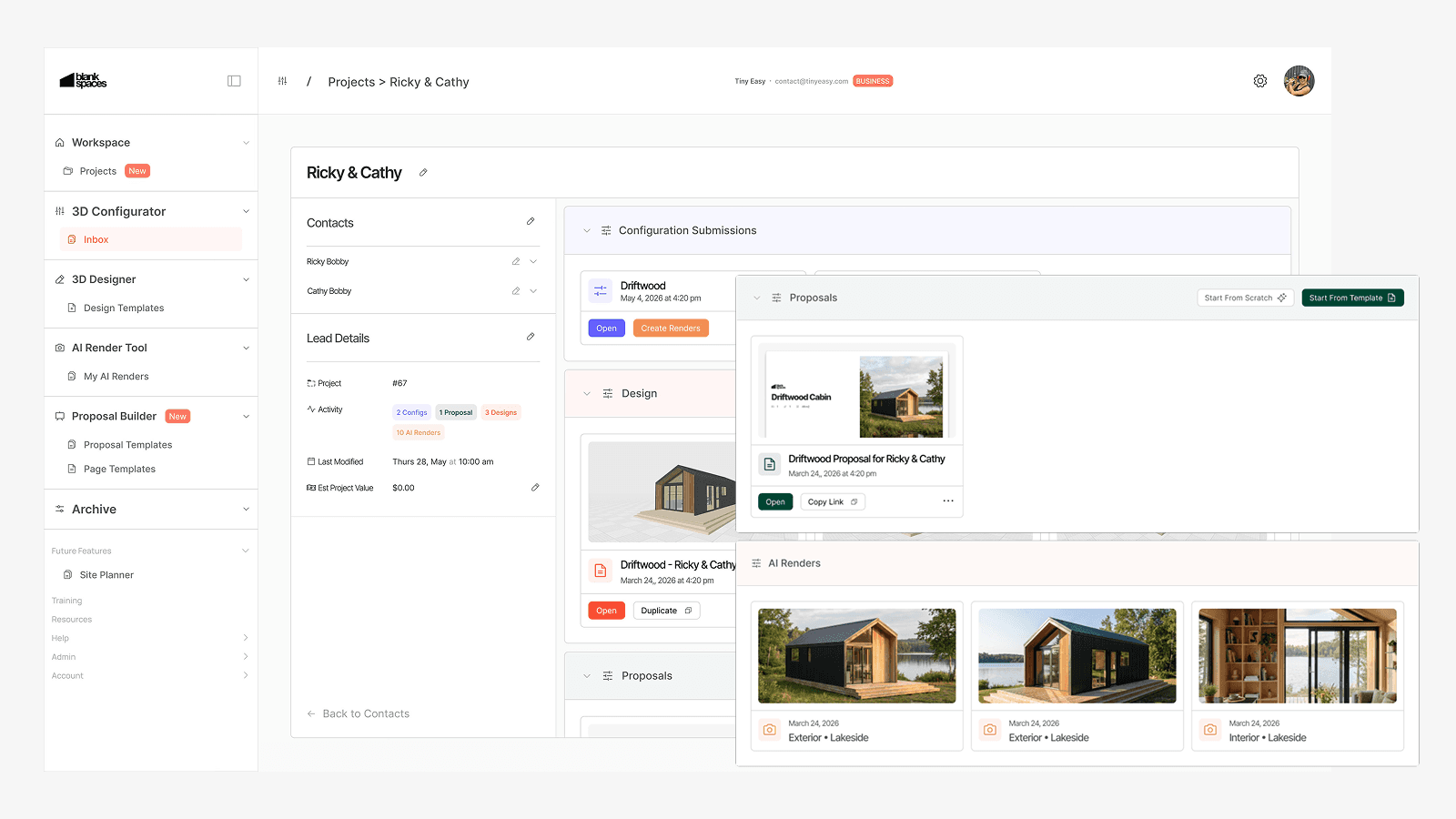
Configuration Inquiries, 3D Designs, Proposals and AI Renders connected within Projects
A new condensed Project List View for scanning and managing more Projects
Unlimited Projects across every 3D Designer subscription tier
3D Designer capacity measured using Active Designs and Design Templates only
Improved archiving, allowing archived Designs to remain connected to their original Project
Existing customer capacity moving from the temporary transition allowance to the capacity included in their current subscription tier
Watch the full update walkthrough
Added
Project Workspace 2.0
A customer Project often includes much more than a single design file.
It may begin with a Configuration Inquiry submitted through your website. From there, the customer may move into a custom 3D Design, explore several variations, request AI Renders, receive a Proposal and continue through your wider sales and design process.
Previously, these resources could live across separate areas of the Dashboard. Project Workspace 2.0 gives them one shared home.
Within a Project, you can now connect:
Configuration Inquiries
3D Designs
Proposals
AI Renders
This gives your team a clearer view of the work completed for each customer without needing to piece together information from several areas of Tiny Easy.
Whether you use one Tiny Easy module or combine several modules across your workflow, Projects now act as the central workspace connecting the relevant customer information.
Related update for 3D Configurator customers
We have also released Configurator Inbox, giving your team a dedicated place to review submitted configurations, customer details, selected options, pricing and pre-qualifying answers inside the Tiny Easy Dashboard. The update also introduces optional Configurator AI Renders, allowing you to turn submitted configurations into polished visuals for customer follow-up.
Read the full Configurator Inbox + Configurator AI Renders changelog.
New condensed Project List View
As your business grows, so does the number of leads, customers, revisions and jobs moving through your workflow.
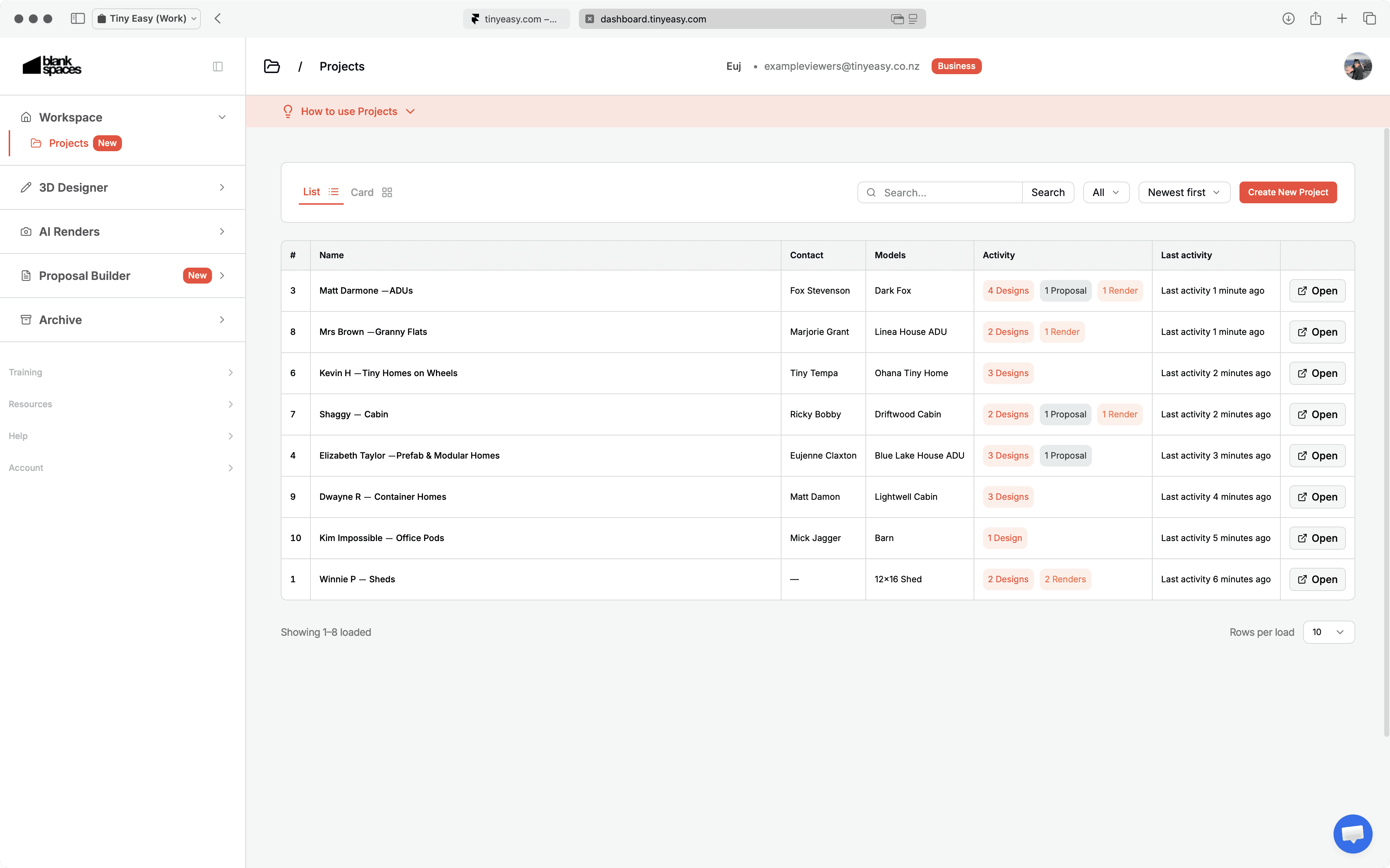
The new condensed Project List View gives you a more compact way to scan, search and open Projects from the Dashboard. It reduces the amount of scrolling required and makes it easier to find the right customer or job when you are managing a larger workspace.
This view is especially useful for businesses that:
Manage a growing number of inquiries and active customers
Use multiple Tiny Easy modules
Create many Projects each month
Need a clearer overview of ongoing sales and design work
Improved
Unlimited Projects across every 3D Designer plan
We have simplified the way 3D Designer capacity works.
Previously, subscription plans included separate limits for:
Active Projects
Active Designs
Design Templates
With this update, Projects are unlimited across every 3D Designer plan.
Your subscription tier now determines only:
The number of Active Designs you can work on at the same time
The number of Design Templates you can keep active
This gives you more freedom to create a Project for every relevant lead, client, completed job or future opportunity without using capacity simply because the Project exists.
You can also decide how your Active Design capacity is distributed. One customer may need several active design variations, while another Project may only contain one Active Design, a Proposal, AI Renders or an archived reference Design.
New 3D Designer capacity
Plan | Active Designs | Design Templates | Projects |
|---|---|---|---|
Starter | 2 | 3 | Unlimited |
Basic | 6 | 5 | Unlimited |
Growth | 12 | 7 | Unlimited |
Scale | 20 | 9 | Unlimited |
Pro | 40 | 15 | Unlimited |
Custom | Tailored | Tailored | Unlimited |
You can view the latest plan details on our Pricing Page.
Why we made this change
A separate Project limit did not always reflect the amount of active design work a business was completing.
For example, one customer may need several active Designs while another Project may only require one Design, a Proposal and a few Renders. Under the previous structure, both Projects used capacity even though the amount of active design work was very different.
The updated model is based more closely on where work is actively happening:
Create a Project for every relevant lead or customer
Keep several Designs within one Project where needed
Use Active Design capacity for work currently being edited
Archive inactive Designs while retaining their connection to the customer project.
Archived Designs can remain connected to their Project
Design archiving is now more useful within the wider customer workflow.
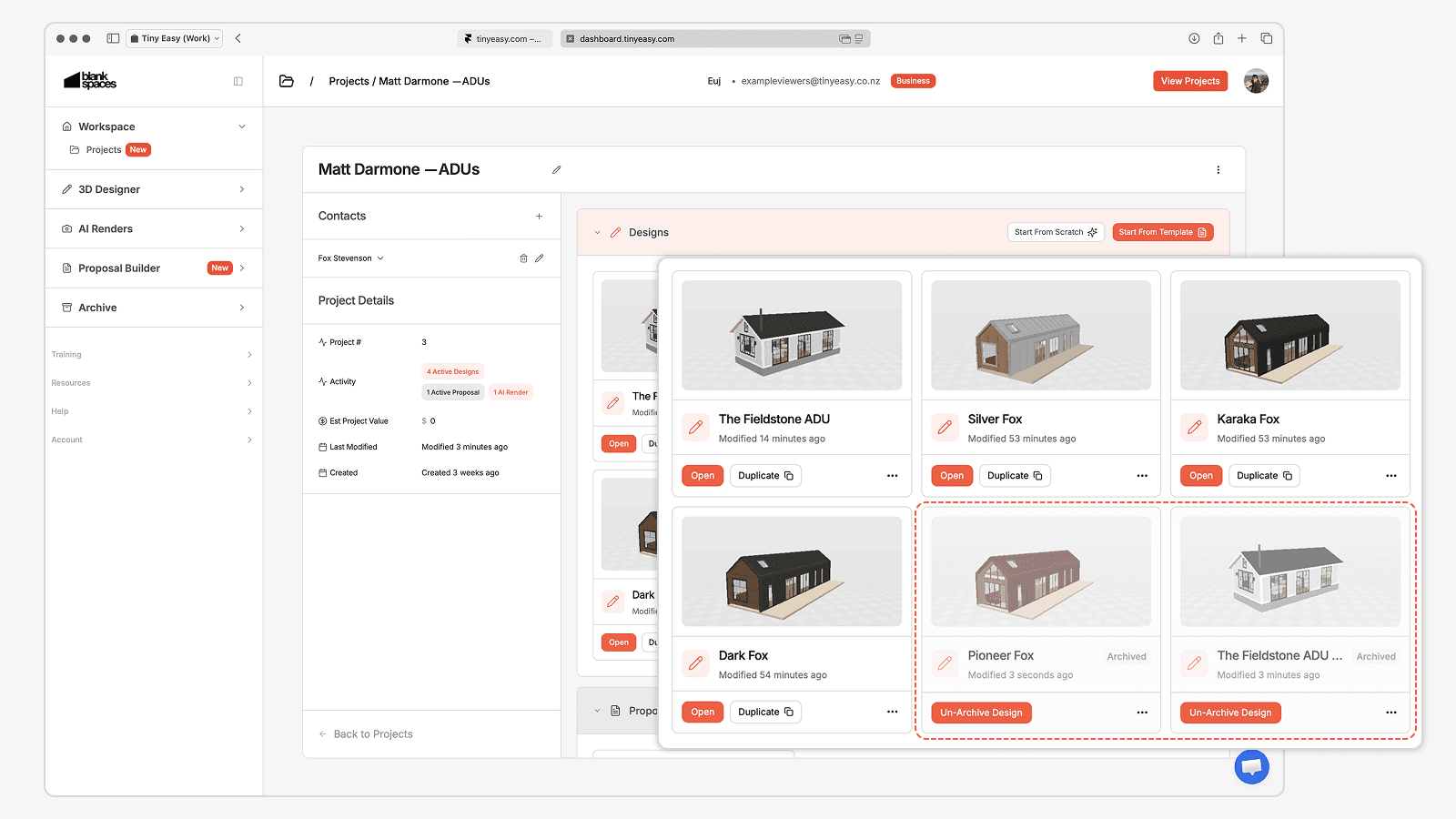
When you archive a Design, it can remain visible within its original Project as a greyed-out archived item. This preserves the history of the Project while freeing an Active Design slot for new work.
For example, a customer may explore several layouts before choosing one final direction. Instead of removing the unused concepts from the Project, you can archive those earlier variations and keep them attached as part of the customer history.
What to know before archiving
Archived Designs do not count toward your Active Design capacity
The archived Design can remain visible within its related Project
Archived Designs cannot be opened in the 3D Designer while inactive
Any attached 3D Viewers become inactive while the Design is archived
You can restore an individual archived Design once every 30 days
This makes it easier to keep your active workspace focused without losing the context of how a customer Project developed.
Capacity transition for existing 3D Designer customers
When we introduced the first version of Project Workspace and the updated 3D Designer subscription structure in March 2026, we temporarily gave existing customers the capacity of the next plan tier at no additional cost.
For example, a customer subscribed to the Basic plan temporarily received the capacity included in the Growth plan.
This temporary allowance gave customers more room to organise their workspace while we observed how Projects, Designs and Templates were being used in real business workflows. What we learned helped shape the more flexible structure introduced with Project Workspace 2.0.
From 14 July 2026, existing customer accounts reflect the Active Design and Design Template capacity included in their current subscription tier.
What is changing
Active Design capacity is based on your current 3D Designer plan
Design Template capacity is based on your current 3D Designer plan
The temporary next-tier capacity provided during the transition has ended
What is not changing
Projects are unlimited across every plan
Archived Designs do not use Active Design capacity
Do you need to take action?
No action is needed where your current Active Design and Design Template usage fits within the capacity included in your plan.
If your workspace currently contains more active items than your plan includes, we recommend reviewing your Designs and Templates and archiving anything that is no longer being actively worked on. You may need to free capacity before creating or restoring additional active work.
You can also move to a higher 3D Designer tier where your business regularly needs more Active Designs or Design Templates available at the same time.
Recommended workspace review
Take a few minutes to:
Archive Designs that are no longer actively being edited
Keep earlier design variations connected to their Project as archived references
Review your Design Templates and retain the models your team actively uses
Check that your current plan matches the amount of simultaneous design work your business manages
Our team can help you review your workspace and identify the most practical setup for your workflow.
Building a more connected Tiny Easy workflow
Project Workspace 2.0 is another step toward making Tiny Easy a more connected place to manage your sales, design, visualisation and proposal workflow.
Instead of treating each module as a separate destination, we are building a system where the information around a customer can remain connected as their Project progresses.
Need help reviewing your workspace or understanding your plan capacity?
July 2026 Update: Configurator Inbox + Configurator AI Renders
July 15, 2026

We have released two major additions for 3D Configurator customers:
Configurator Inbox for managing submitted configuration inquiries inside the Tiny Easy Dashboard
Configurator AI Renders for turning submitted configurations into stronger, sales-ready images
Together, these features help connect the journey from a visitor configuring a home on your website to your team following up, visualizing their selected design, and progressing the enquiry into a Project.
At a glance:
This update includes:
A dedicated Configurator Inbox inside the Tiny Easy Dashboard
A clearer view of every submitted Configuration Inquiry
Customer details, selected options, pricing information, and pre-qualifying answers in one place
The ability to connect Configuration Inquiries with Projects, Designs, Proposals, and AI Renders
New Configurator AI Renders, available as an optional additional subscription
A guided rollout for existing Configurator customers
Added
Configurator Inbox
Every completed 3D Configurator journey creates valuable sales context.
A customer may have explored a specific model, selected layouts, materials, upgrades, and options, answered your pre-qualifying questions, and shared their contact details. Until now, much of that information has typically been handled through individual enquiry notifications to your email inbox, or is pushed into your CRM.
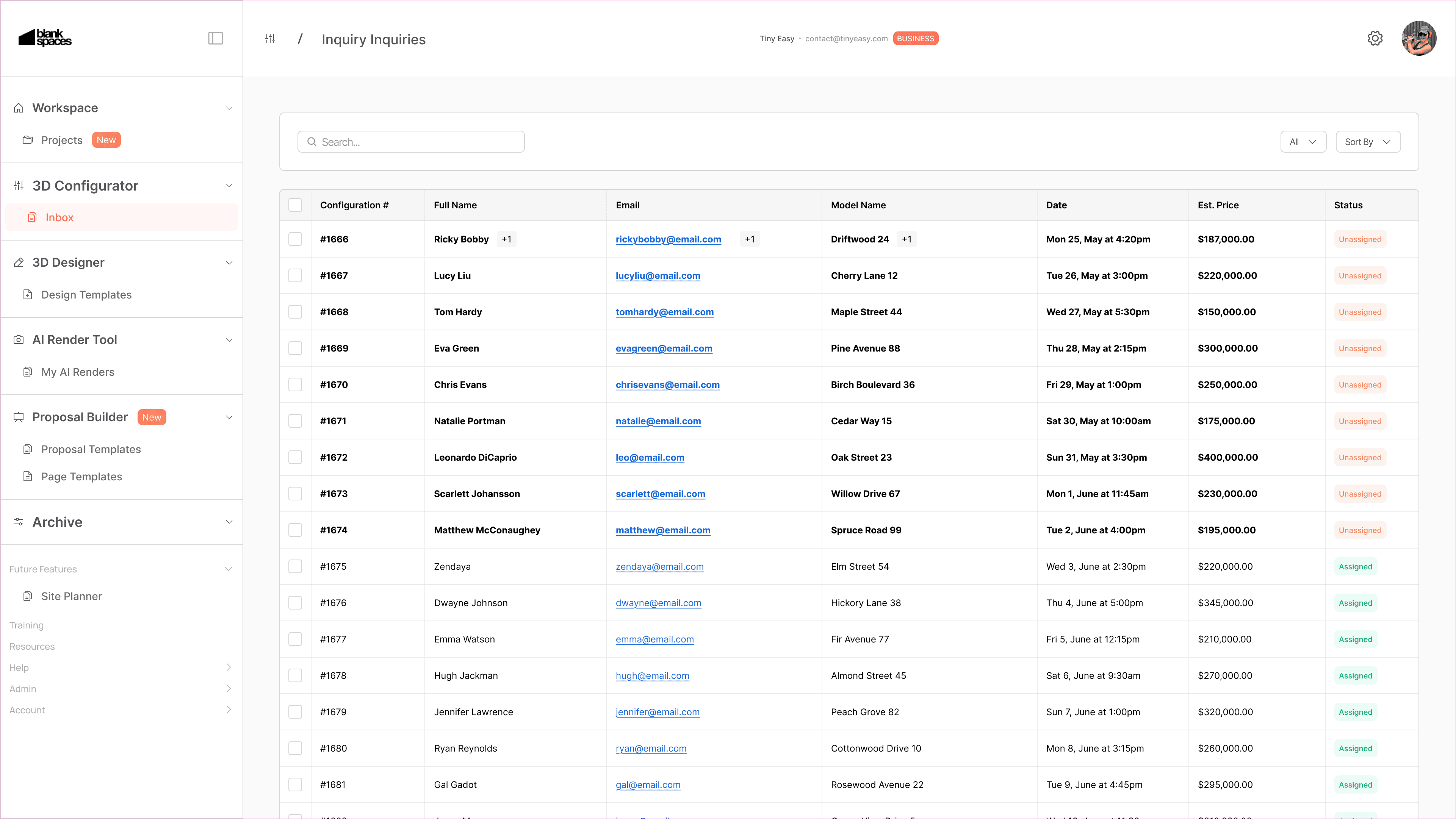
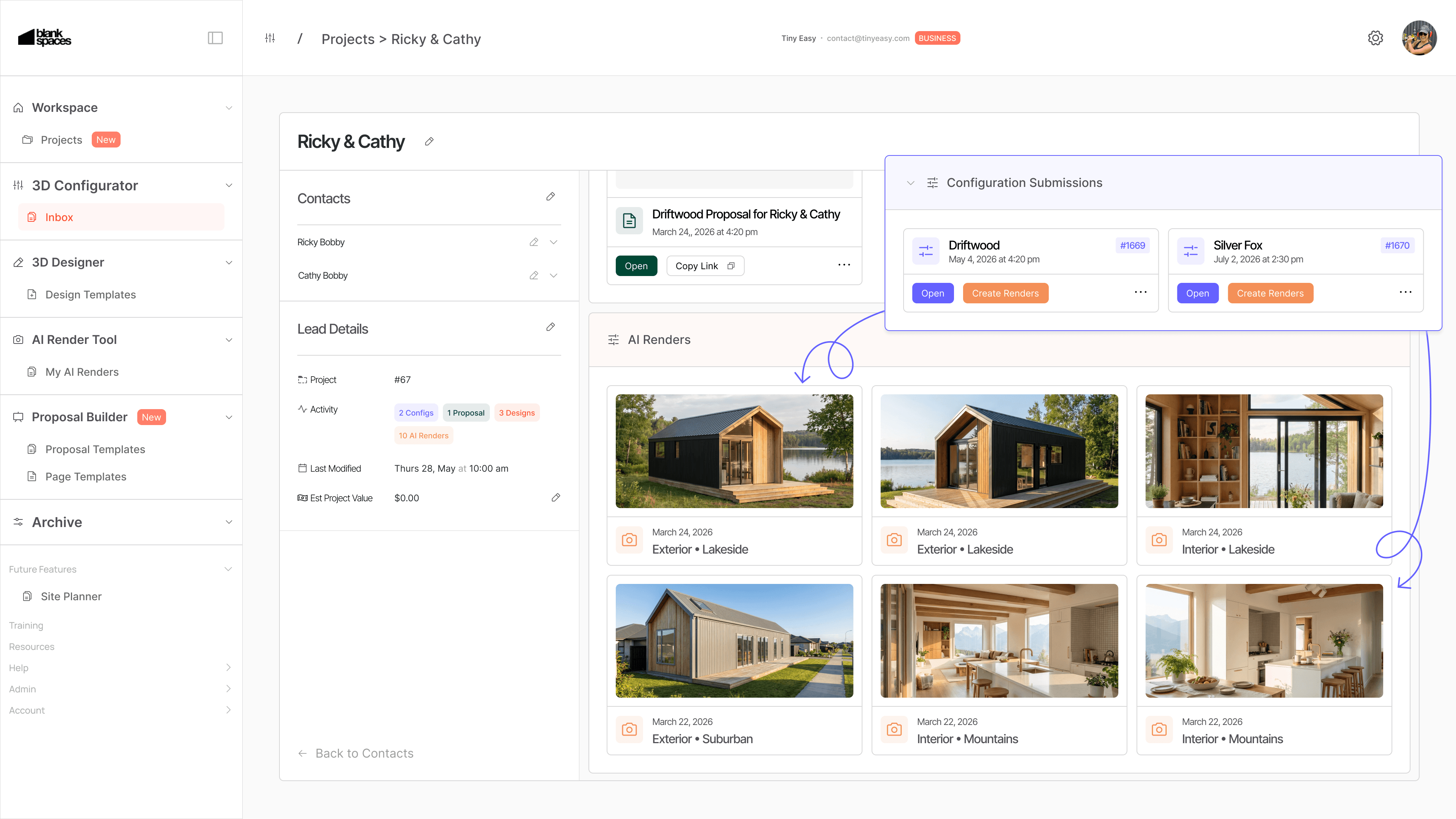
The new Configurator Inbox gives you a new dedicated place in the Tiny Easy Dashboard to review and manage those submitted Configuration Inquiries.
For each inquiry, your team can see the information submitted by the customer in one structured view, including:
Customer contact details
The model or configuration they submitted
Their selected layouts, materials, upgrades, and options
Pricing information, where pricing is enabled for your Configurator
Answers to your pre-qualifying questions
Any additional information supplied through your enquiry form
Configuration Inquiries can now become part of a Project
The Configurator Inbox is designed to work closely with the new Project Workspace.
When an enquiry develops into an active opportunity, you can connect the Configuration Inquiry to a dedicated customer Project.
From there, the Project can become the shared place for the work that follows, including:
The original Configuration Inquiries
Custom 3D Designs
AI Renders
Proposals
Future revisions and related resources
This creates a clearer path from the first website interaction through to a custom design, proposal, and next steps.
For businesses using both the 3D Configurator and 3D Designer, this helps bridge the gap between inbound sales enquiries and the more detailed design work that often follows.

Configurator AI Renders
We have also introduced AI Renders for the 3D Configurator.
Configurator AI Renders allow you to turn a submitted customer configuration into polished visual content that helps them better understand the home they have configured.
Rather than following up with only a list of selected options or a specification summary, you can use AI Renders to create a more compelling visual conversation around the customer’s chosen design direction.
This can be especially useful when a customer has selected specific, exterior finishes, materials, layout options, upgrades and styling choices.
AI Renders can help you:
Create more engaging follow-up material for serious enquiries
Bring a configured home to life visually
Support conversations around materials, finishes, and design direction
Give customers a stronger sense of what they are working toward
Create more polished visuals for sales conversations and proposals
AI Renders are particularly useful when a customer is interested, but still needs greater confidence before taking the next step.
Guided rollout for existing Configurator customers
We are rolling out the Configurator Inbox through short personal walkthroughs with existing Configurator customers.
This allows us to help you set up the feature around your current sales process, answer questions directly, and learn from how your team manages real enquiries.
During the walkthrough, we can cover:
How to review and manage Configuration Inquiries
How Configuration Inquiries connect to Projects
How the Inbox fits alongside your current email, CRM, or sales process
How Configurator AI Renders can support your follow-up workflow
The Configurator Inbox will be activated for your account following this walkthrough.
Configurator AI Renders are an optional add-on
Configurator AI Renders are available as an additional subscription module for Configurator customers.
The add-on module is designed for businesses that want to turn submitted configurations into stronger sales visuals and create a more visual follow-up experience for potential customers.
If you would like to see how this could work for your models and sales process, talk to to us and we can walk you through it personally.
From a configuration submission to a connected customer workflow
The 3D Configurator has always been designed to help website visitors explore your homes, understand their options, and submit more informed enquiries.
This update builds on that foundation.
The Configurator Inbox gives your team a clearer place to receive and understand those enquiries. Project Workspace allows that information to stay connected as the customer moves into custom design, renders, and proposals. Configurator AI Renders add a more visual way to continue the conversation.
Together, these tools create a more connected workflow:
Configure → Submit Inquiry → Review → Visualise → Design → Propose
This is an important step in building a more practical sales and design system for businesses selling tiny homes, ADUs, cabins, prefab spaces, and other small homes.
Book your walkthrough to unlock Configurator Inbox
Want to see the Configurator Inbox and Configurator AI Renders in action?
Book a personal walkthrough. We will show you how the new workflow fits around your existing Configurator, sales process, and customer journey, and activate your Configurator Inbox after the call!
Book a Walkthrough: https://calendly.com/tinyeasy/personal-meeting-w-till
March 2026 Update: Project Workspace
March 31, 2026
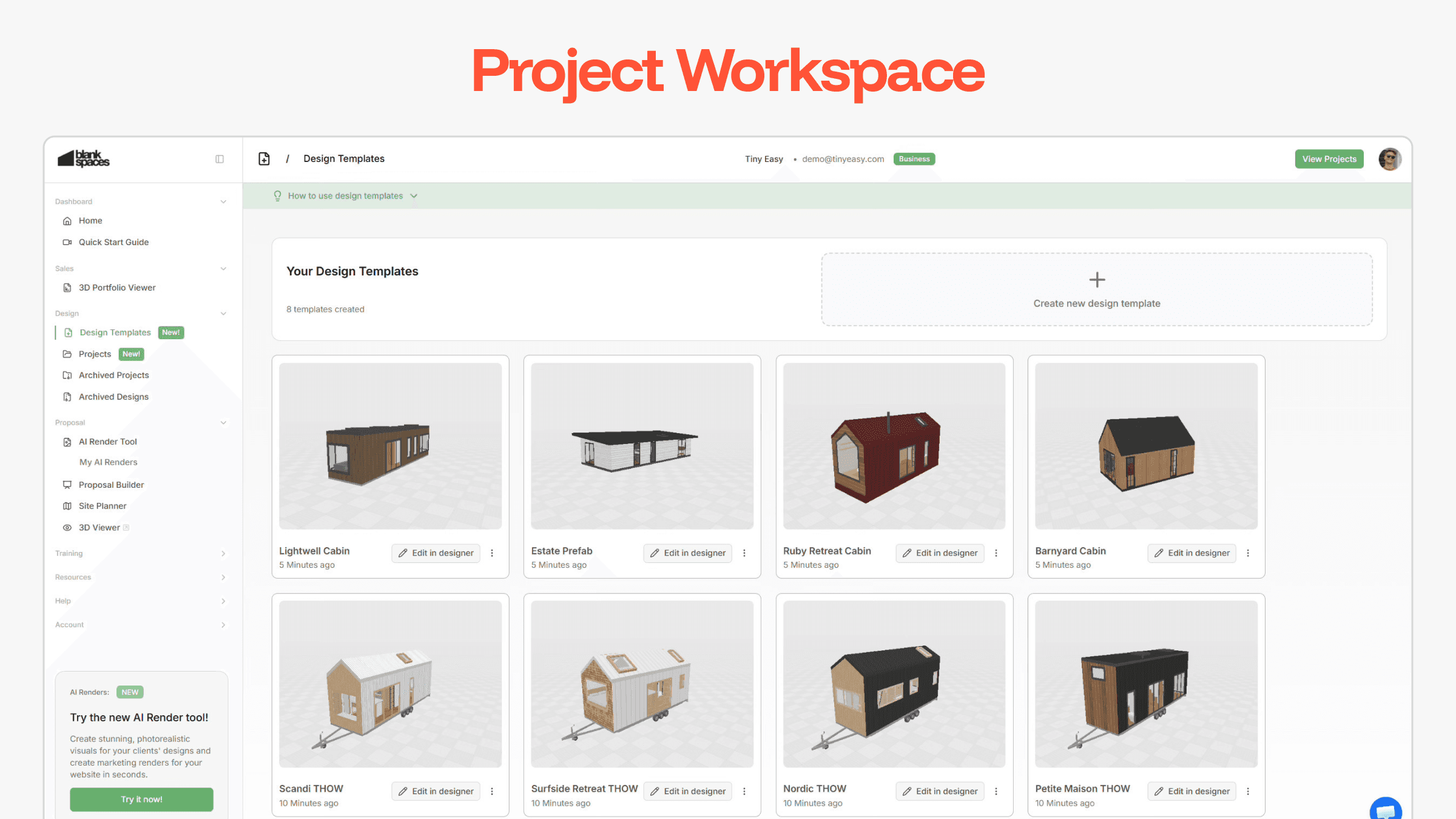
We’ve launched a major update to the Tiny Easy Dashboard!
The Project Workspace is a new way to create, organize, and manage your projects and designs directly from your Dashboard - instead of accessing them through the 3D Designer software.
As your business grows, so does the number of leads, signed clients, and their attached revisions, and design variations.
The Project Workspace gives you a clearer structure for managing:
Active Projects assigned to clients
Design Variations attached to each Project
Template Models of your range of “staple designs” your business is known for!
This update lays the foundation for a more efficient workflow when managing multiple jobs, and working on closing the next client!
Read further to learn how to transition your designs into this new Project Workspace.
Added
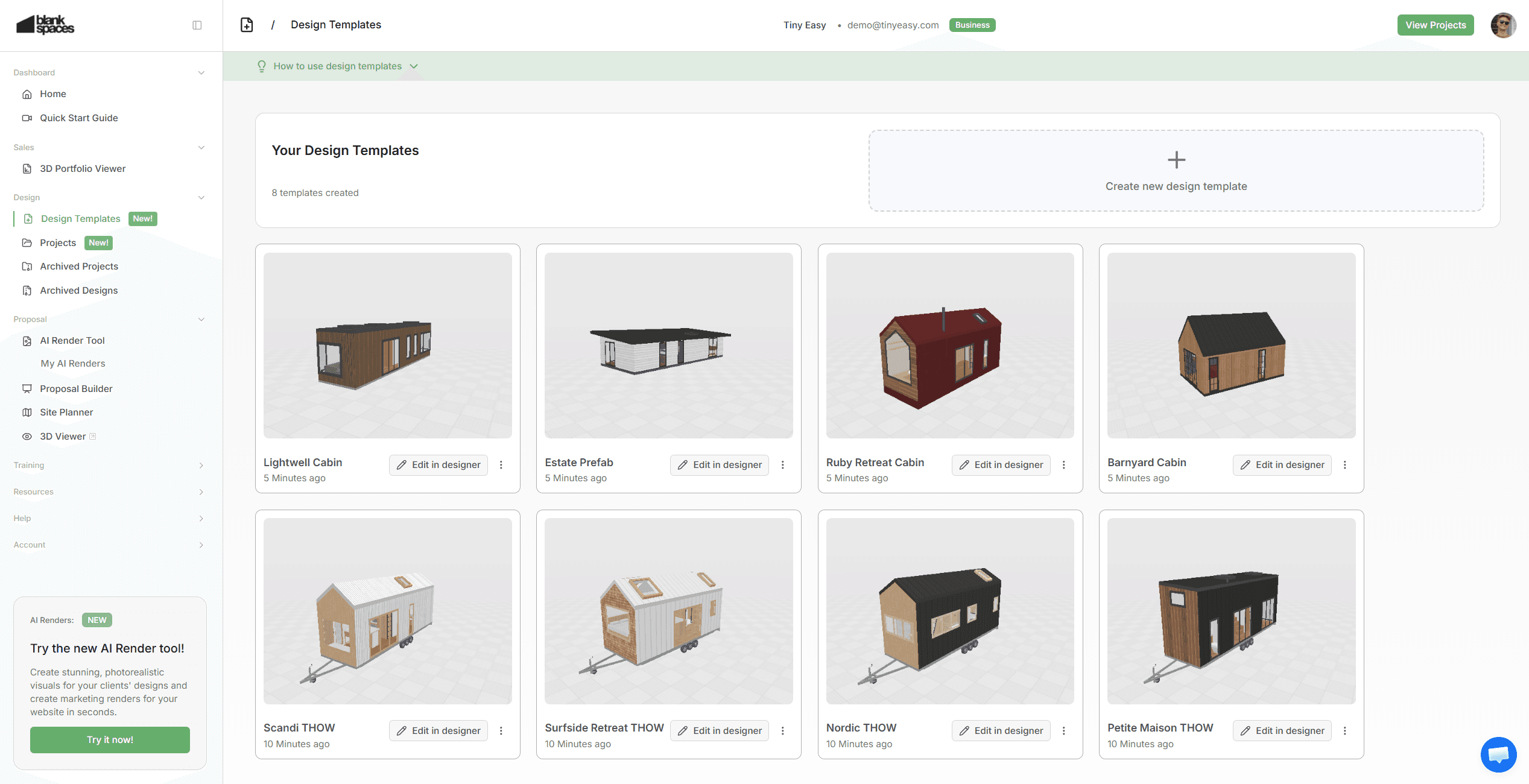
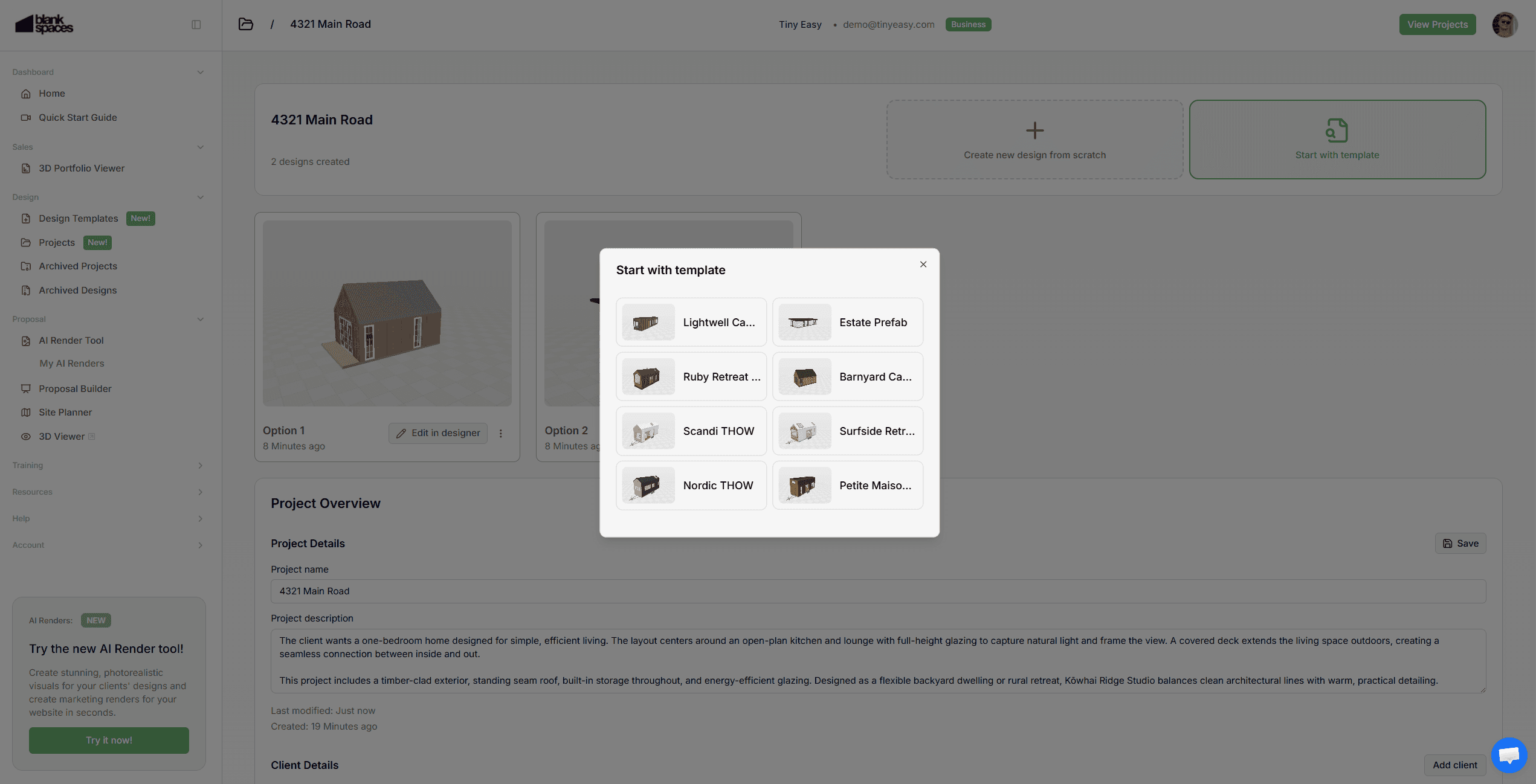
Design Templates:
Turn your staple models into reusable templates.
Create and manage templates directly from your dashboard.
Rename designs without opening the design software
Start new designs for clients with your own curated templates
Your model range becomes structured and ready to deploy at any time
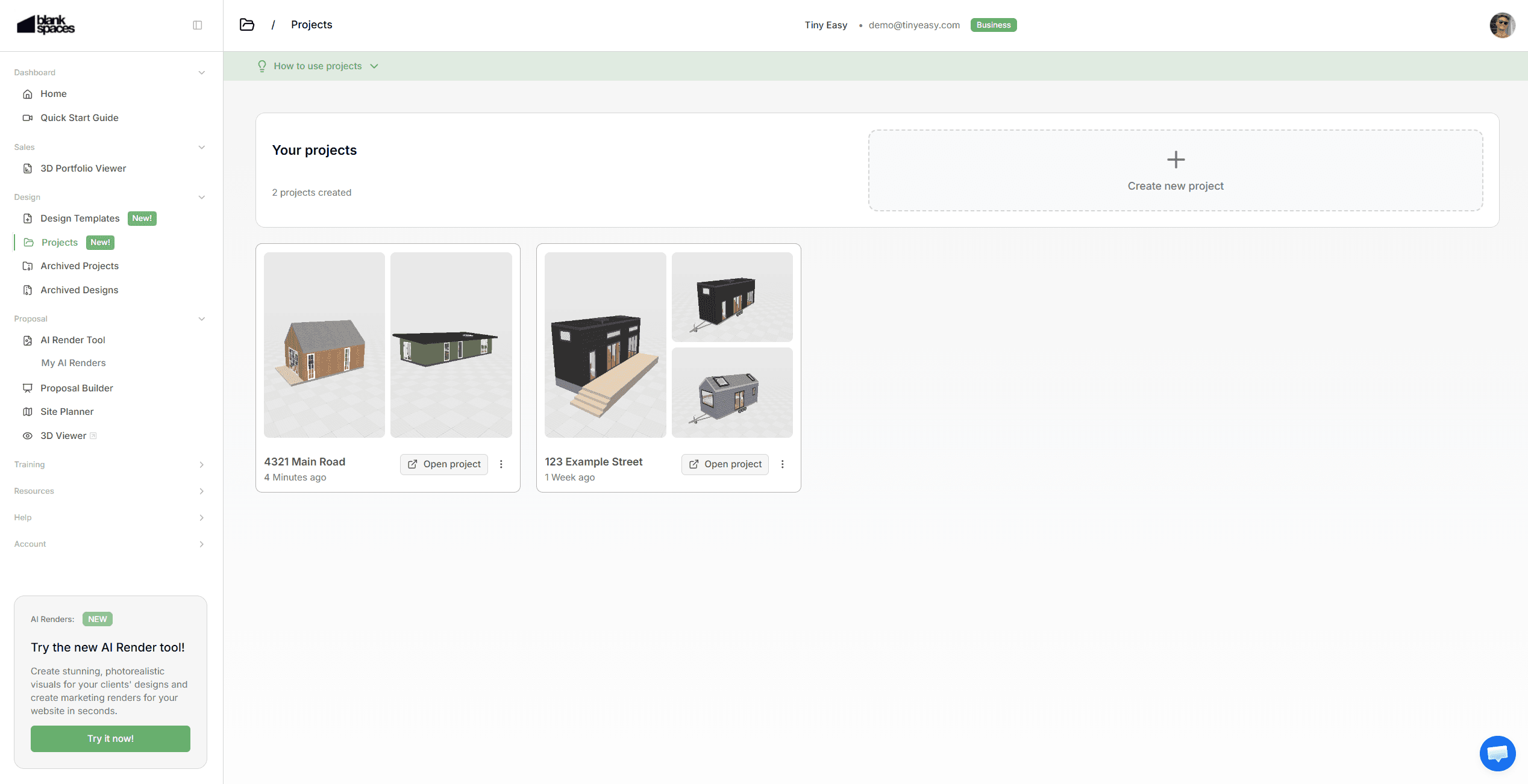
Projects:
Create a dedicated project for each new lead or client.
Within each project you can:
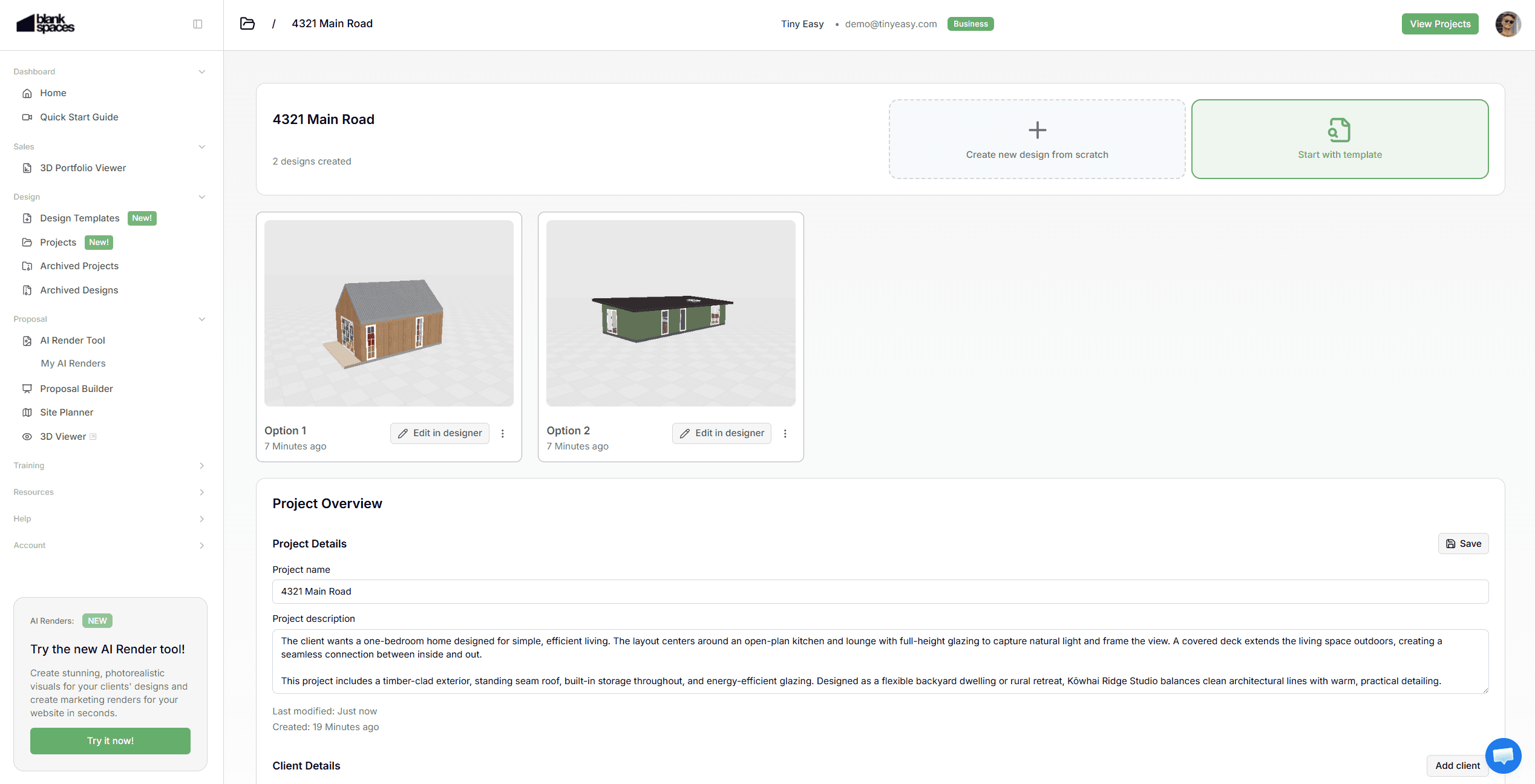
Assign and manage designs for each project. Create multiple variations & revisions for each client easily.
Store client details
Add project information for internal use
Instead of keeping designs scattered across a long list in your account, every project & dedicated design now has a clear home.
Project Designs:
Inside each project, you can:
Create a brand new design from scratch
Choose from one of your existing design templates.
Keep multiple designs organized under one project.
This makes it easier to manage revisions and compare options without losing structure.
Design Archiving:
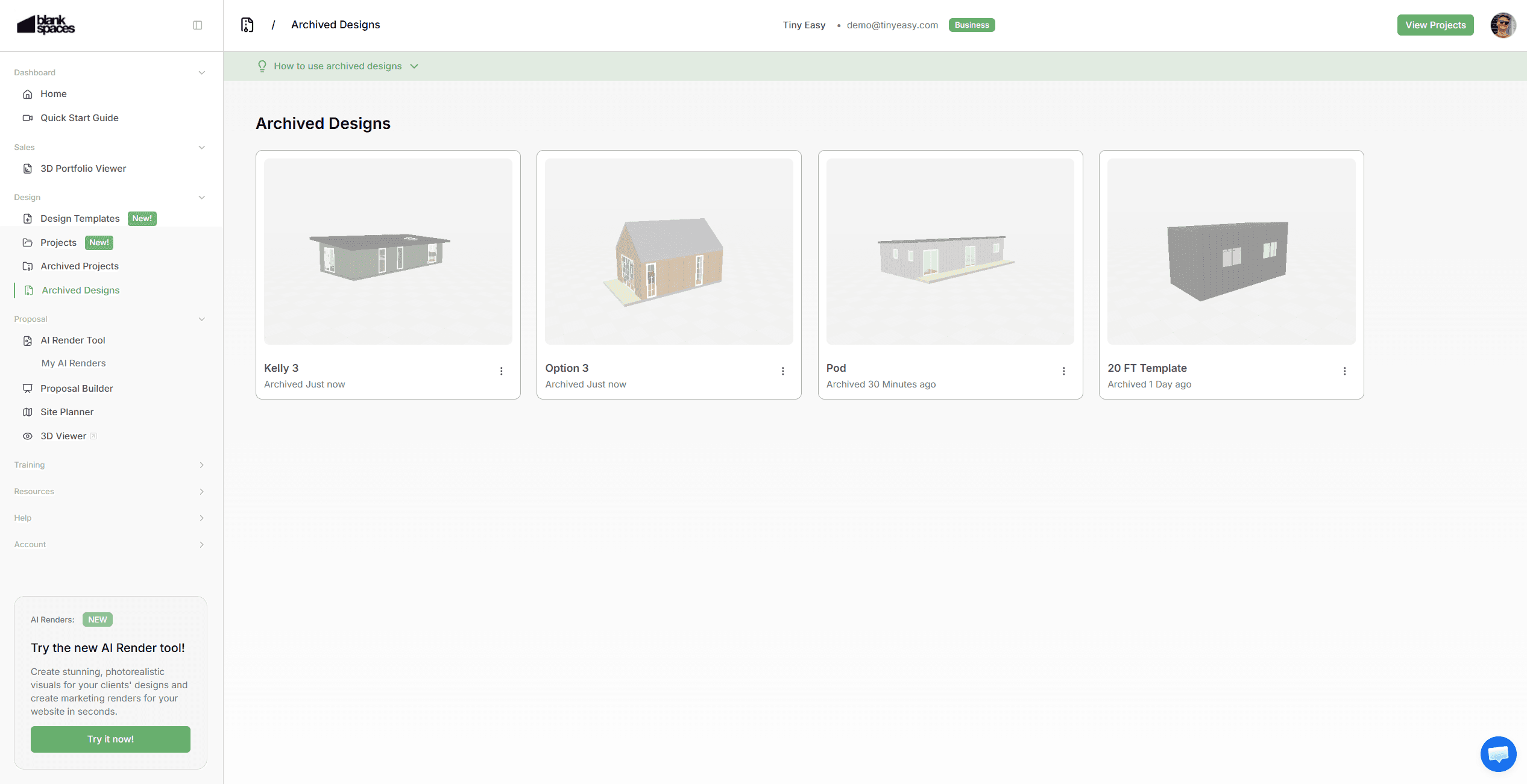
We’ve introduced a flexible archiving system for better organisation.
You can now archive:
Design Templates
Designs within Projects
Archiving helps you:
Keep your active workspace clean
Remove old or unused designs without deleting them
Free up space if you're approaching capacity for your plan
Archived designs are stored safely in a dedicated Archived Designs page.
You can restore them by:
Moving them back into an active project
Turning them into a template
Permanent deletion can only happen from the archived section, reducing the risk of accidental loss.
Project Archiving:
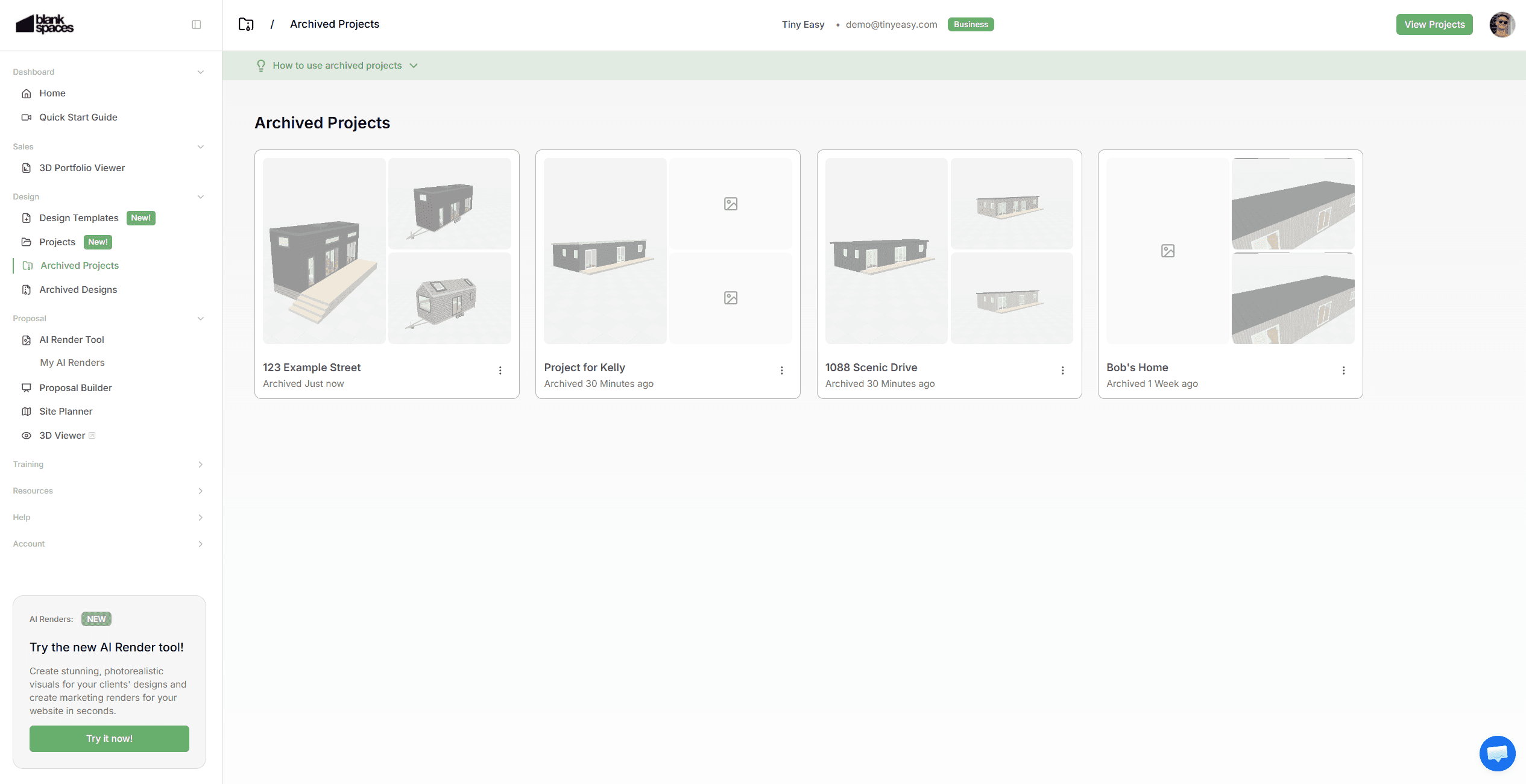
Projects can also be archived once completed or no longer active.
Archived projects move out of your active workspace
Designs inside archived projects remain safely stored
You can reactivate projects when needed
This ensures your active workspace only shows current jobs, making it easier to focus on what’s on the go.
Transitioning Your Existing Designs into the Project Workspace
As we move your Designs to be managed within the 3D Designer Software, into the Project Workspace within your Dashboard, it’s time for you to mkae this transition too!
All of your existing, unsorted Designs will be moved into the Archived Designs page.
From there, you can now work on sorting your Designs!
We recommend going through your list of Designs to:
Set any of your “Staple Models” as your new Template Designs.
Create Projects for any active clients & leads you are working on.
Move any Designs into their new dedicated Projects.
Any Designs you no longer need, simply leave them in your Archived Designs for later!
Improvements to Your Existing Designer Subscription
Alongside the Project Workspace, we've updated how our subscription plans work to better reflect how you actually use the designer.
Rather than basing subscriptions on static "business size", we've introduced a more flexible Tier system.
This means you can adjust your Tier anytime depending on the capacity you need from the 3D Designer, so you're never overpaying or held back.
When business is quiet, downgrade to save money. When things get busy, upgrade your Tier to handle more projects and close more clients.
Each Tier now includes capacities for:
Design templates
Projects
Designs with Projects
To make this transition seamless, we have converted existing customers to their respective Tier in the new system,
As a bonus, existing customers have temporarily upgraded to the next highest tier of their subscription, free of charge for the next 3 months.
During this time, we recommend getting familiar with the structure and organizing your workspace. If your workflow needs more or less capacity, just reach out; week help you find the right fit, including custom setups if needed.
To manage your Tier:
Go to the Licenses page in the Dashboard to view your Tier. Click the "Change Plan" button to view all available Tiers.
Improved
Clearer Access to your Designs
We've simplified how you access and create designs inside of Tiny Easy.
Previously, designs lived primarily inside the design software. Now, you can create and manage them directly from the dashboard — making it easier to control where designs are stored and how they’re organised. This gives you a clearer structure from the start of every project.
Your Templates, Not Ours
Instead of using “Tiny Easy Templates” you can now use your own Design Templates.
This update reinforces ownership of your model range. Your templates are the foundation of your projects — ready to customise, and deploy whenever a new lead comes in.
You can still take inspiration of the Tiny Easy Templates when creating a new design from scratch.
Safer Design Recovery
With the introduction of Archived Designs, you now have a safety layer.
If a design is removed from a project or templates list, it’s not gone forever. You can access archived designs and restore them.
Only designs that are manually deleted from the Archived Designs page are permanently removed.
This reduces the risk of accidental loss while still giving you full control.
Ongoing Development
The Project Workspace is just the beginning.
We’re actively building tools to strengthen your Sales → Design → Proposal → Hand Off workflow, with a strong focus on improving the Proposal stage.
Here’s what’s coming next:
Proposal Builder:
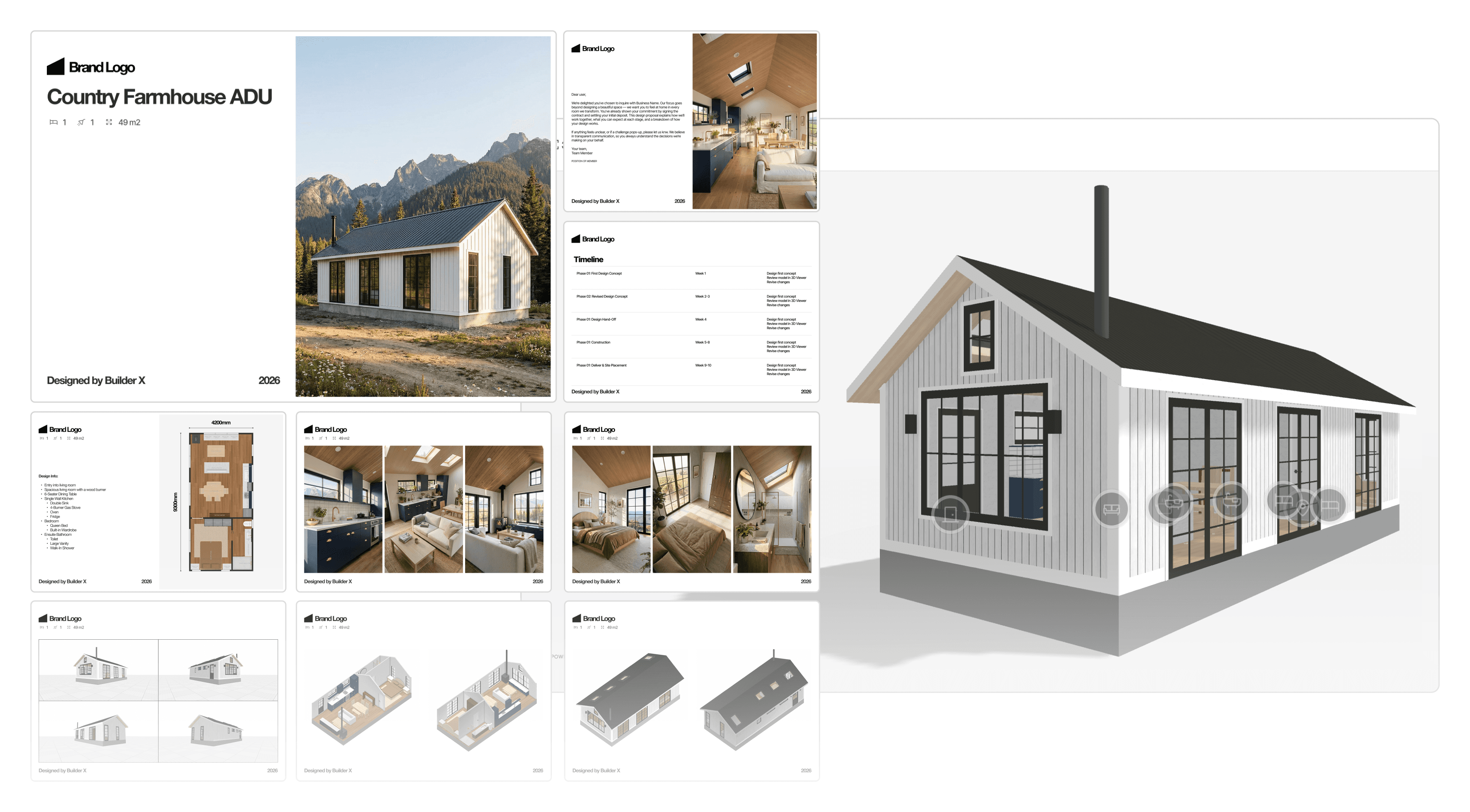
Create professional, branded proposals directly from your projects. This will allow you to create a stunning proposal Experience & Document to make your next clients say “yes” easier!
Some of the points a proposal will include are:
Cover pages
About your business
Floor plans
AI renders & Images
Specifications
Pricing breakdowns
Terms & next steps
All generated from one structured workflow inside Tiny Easy!
Want early access?
Site Placement / Site Planner Tool:
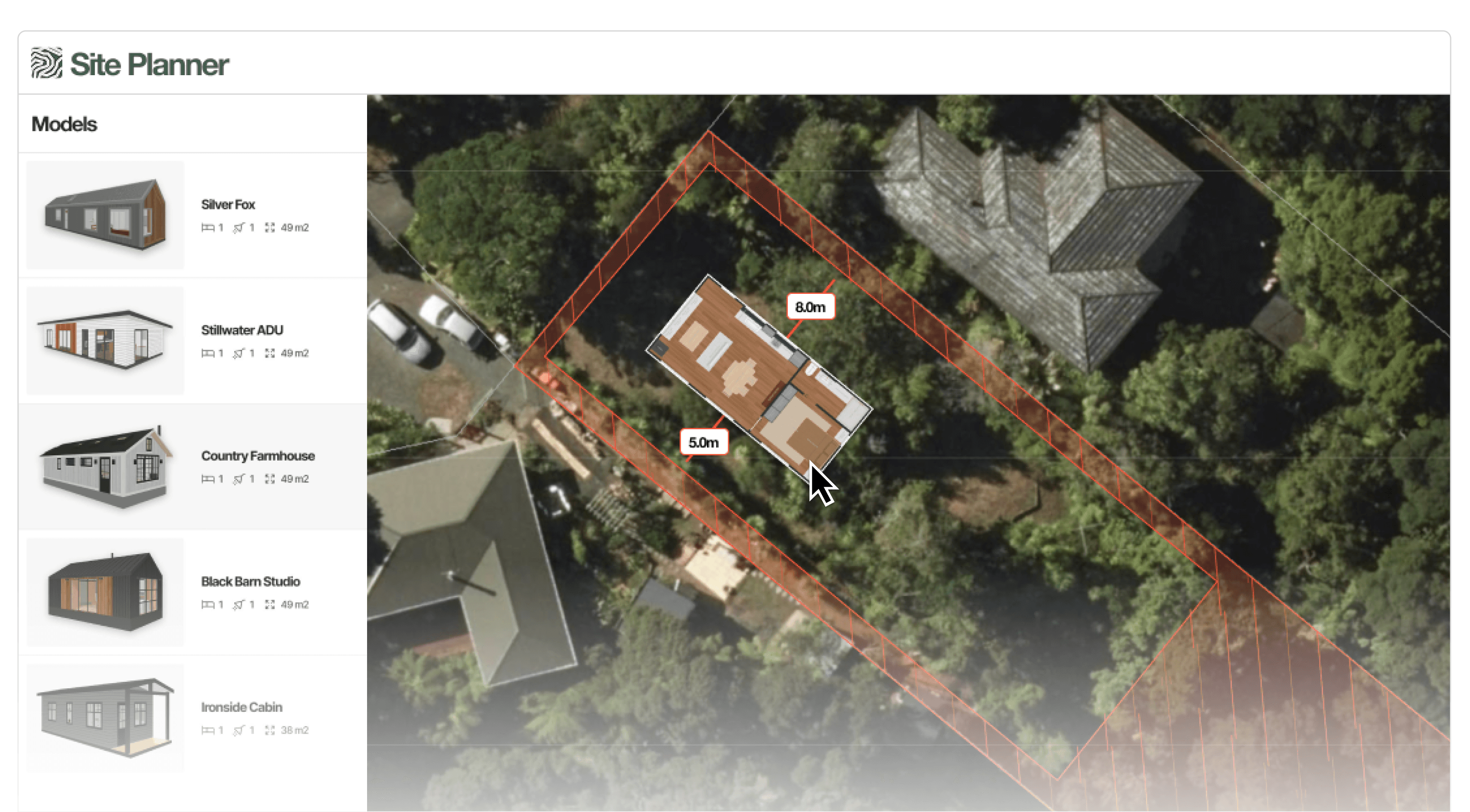
Quickly test whether a design fits on your client’s site.
Load a property by address
Overlay key site constraints
Test placement in minutes
Generate a client-friendly site plan
Answer the most common early-stage question fast:
“Will it fit, and is it allowed?”
Reduce back-and-forth before investing hours in drawings.
Want to see how it works?
March 2026 Update: 3D Design Portfolio Viewer
March 2, 2026
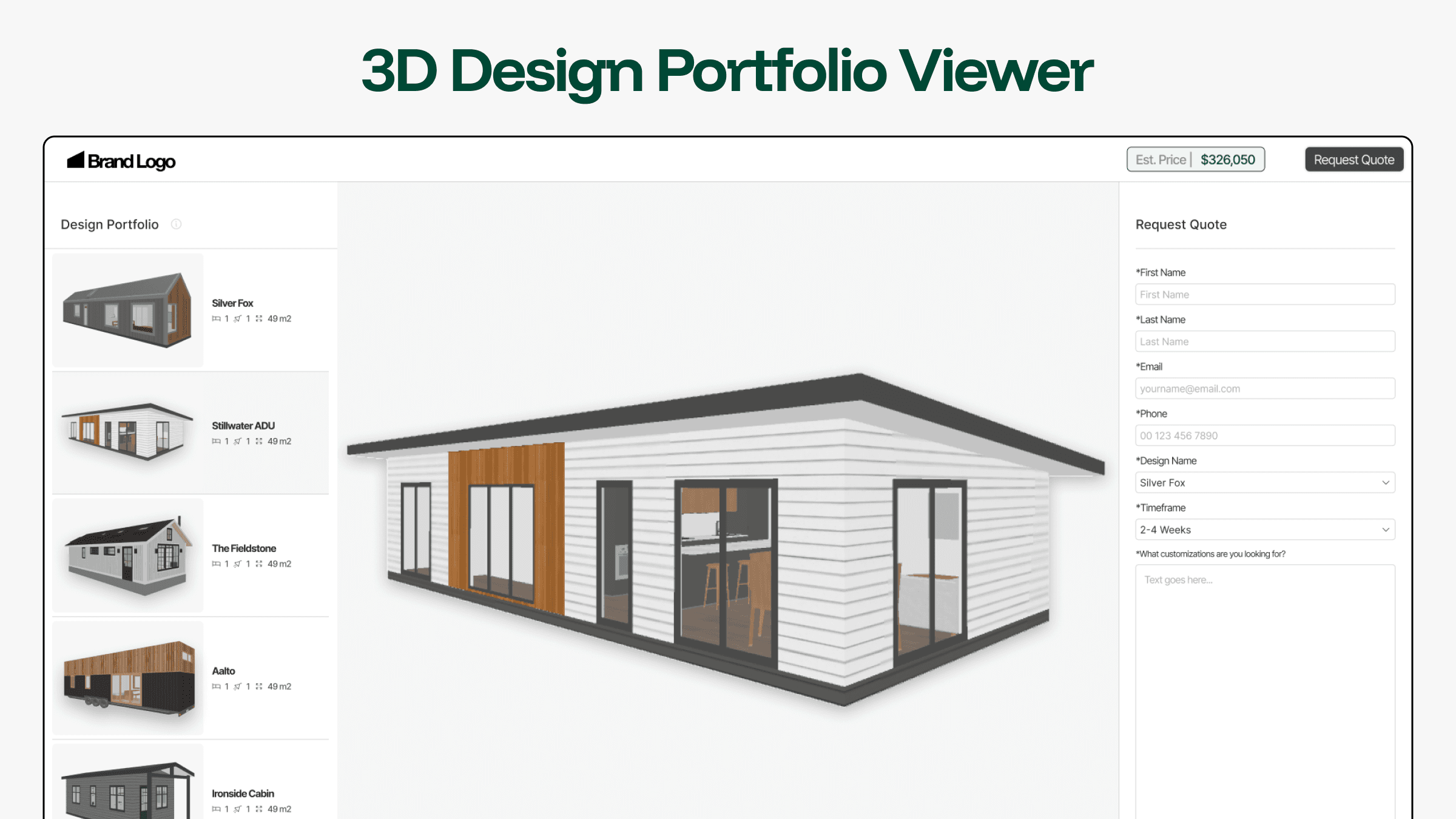
Introducing the 3D Design Portfolio Viewer. It allows you to publish your entire design/model range into one structured, interactive 3D experience directly on your website.
Instead of showcasing a single design or relying on static images across multiple pages, you can now present your full lineup in one centralized “Digital Showroom”. Visitors can browse your entire model range, explore layouts in 3D, compare designs, and understand your range before reaching out.
Once they have picked a design they like, they can answer a few questions & enter their contact details to request next steps with your team, allowing you to collect quality leads instantly!
The 3D Design Portfolio Viewer is designed to strengthen the top of your sales funnel by helping potential clients to self-educate before the first call. We’re excited to see how builders use it to create stronger first impressions and more informed enquiries.
Setup is currently managed directly by our team as part of the 3D Design Portfolio Viewer Beta and only limited slots are available.
Reach out to let us know which models you’d like to showcase, and we’ll configure your 3D Portfolio Viewer ready for embedding on your website.
You can select from our pre-defined enquiry fields, or request specific questions tailored to your sales process. + We can help you send leads to an existing CRM or directly to your email inbox.
If you don’t have a 3D Designer account, we can help get you set up and input your designs as part of an initial setup process (setup fee applies).
The 3D Design Portfolio Viewer is built to showcase your entire model range in one interactive 3D experience.
To clarify how it differs from our other tools:
The 3D Viewer Tool allows you to present a single model in 3D. It's ideal for showcasing a completed custom design, a client-specific variation, or highlighting one standalone model on your website.
Th 3D Configurator allows buyers to customize selected models with layouts, materials, upgrades and guided pricing logic. This is an in-depth customization experience that is best used to show your standard range of options & pricing, specifically helpful if you only allow limited customization.
The 3D Design Portfolio Viewer sits earlier in the journey, It allows prospects to browse all your models in 3D, understand layouts, compare options, and self-educate before committing to a conversation without having to set up an in-depth Configurator journey.
Think of it as a structured, simple digital showroom. Visitors can explore your full range at their own pace, then request a quote or book a meeting directly through the built-in enquiry form.
It’s designed for builders who want to present their complete model lineup without limiting themselves to a single design, or requiring predefined customization paths and pricing logic.
Added
February 2026: AI Render Improvements
Feb 3, 2026
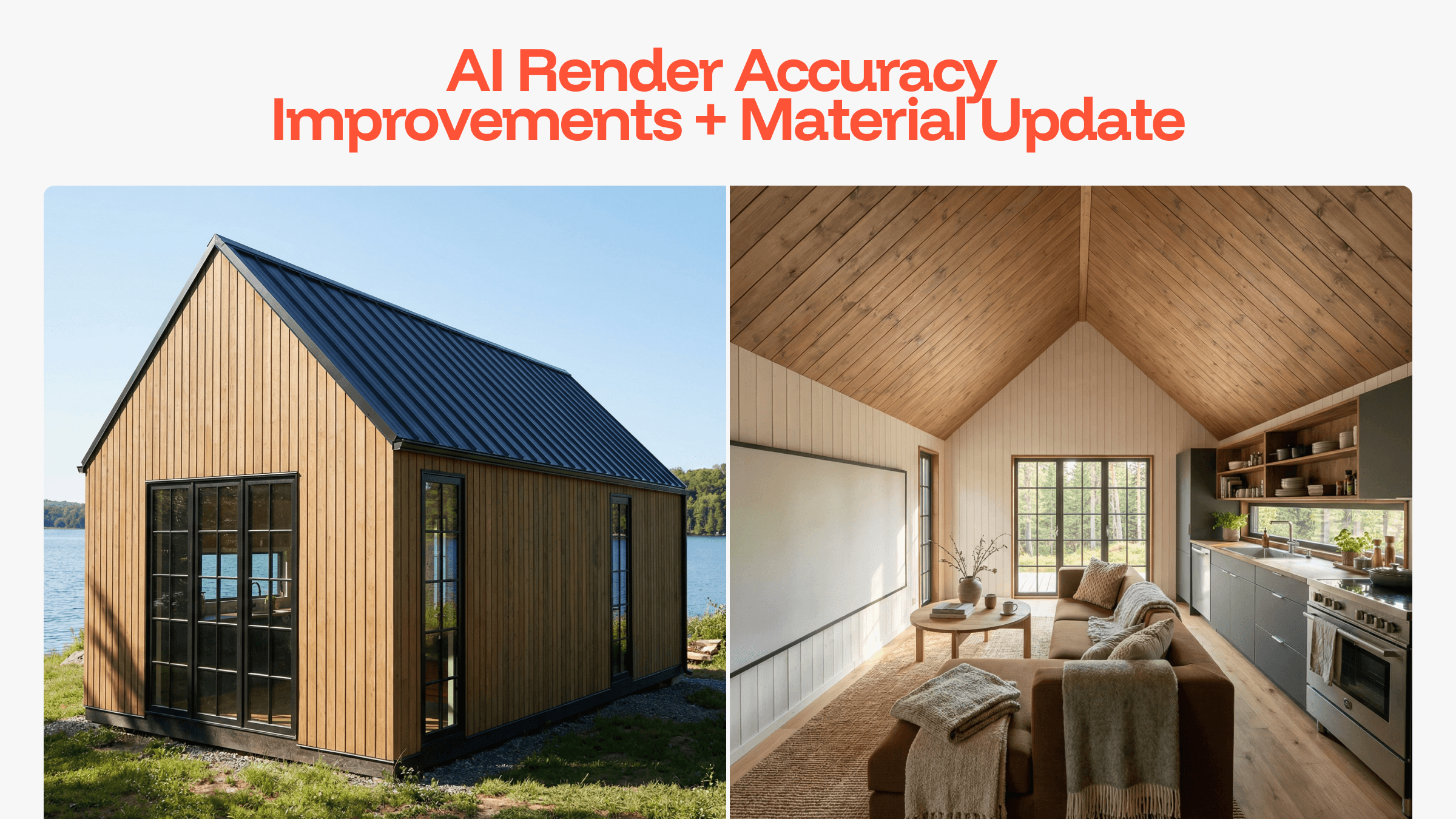
This update focuses on improving the quality and consistency of AI renders. We’ve refined how the AI interprets design details and materials to better support accurate visual outputs, helping renders more closely align with your design intent across different environments and finishes.
Added
AI Render Feedback System
We’ve added a new feedback system to make it easier for you to communicate how well the AI Renders align with your design and selected settings.
When viewing AI Renders in the dashboard, you can now provide feedback directly on the output:
👍 Thumbs up to indicate the render met expectations
👎 Thumbs down to flag an issue, with the option to select what went wrong and add additional comments
This feedback helps us better understand where renders succeed or fall short and informs ongoing improvements to the AI Render tool.
New Environment Options:
We've introduced four new environments to better support different stages of the Sales → Design → Proposal → Hand-Off workflow.
Practical, real-world contexts like Backyard and Suburban help ground early sales conversations and client decision-making, while more scenic environments such as Rolling Hills and Lakefront add greater variety for presentation and proposal visuals.
This gives you more flexibility to choose environments that fits the purpose of each render.
New Material Categories:
Expanded material support gives the AI more accurate surface references for rendering:
VJ Panelling
Board & Batten
Additional Stone Texture Options
Additional Veneer Plywood Options
Additional Timber Flooring Options
Butcher Block Countertops
Improved
AI Prompting & Detail Recognition:
We've refined our internal prompting logic to help the AI better interpret design layout, geometry and textures. This results in:
Improved alignment between the 3D model and final render
Better consistency across the interior and exterior scenes
Fewer visual inaccuracies or "hallucinated" elements
Material Texture Realism:
Existing materials have been upgraded to improve realism both inside the design software and in rendered outputs:
Corrugate Cladding
Tray Cladding
Weatherboard
Timber Flooring
Carpet
These updates improve texture depth, scale accuracy and light interaction for more believable results.
Fixed
Texture Coloring & Scaling:
Ebony Color across all applicable textures
Deck Texture
Ongoing Development
AI Renders - Continuous Refinement:
AI Renders continue to evolve as we refine how materials, textures, and design details are interpreted across different scenes. The new render feedback system allows users to directly highlight where outputs align well with their designs, or where improvements are needed, helping guide future refinements and prioritisation.
We’ll continue rolling out incremental improvements as we learn from real-world usage and feedback.
Project Management System (Dashboard)
We're actively working towards introducing a dedicated Project Management System within the Dashboard to better support how you manage projects across your "Sales, Design, Proposal & Hand-Off" workflow.
Rather then managing an ever-growing list of unordered designs, you will be able to create, access, and manage projects and their associated designs directly from your Dashboard, making it easier to stay organized as your project volume grows.
This system is being designed as a scalable foundation, allowing us to introduce additional-project-related tools over time.
December 2025 Update: Cabinetry Handles & Extended Window & Door Functionality & Style
December 08, 2025
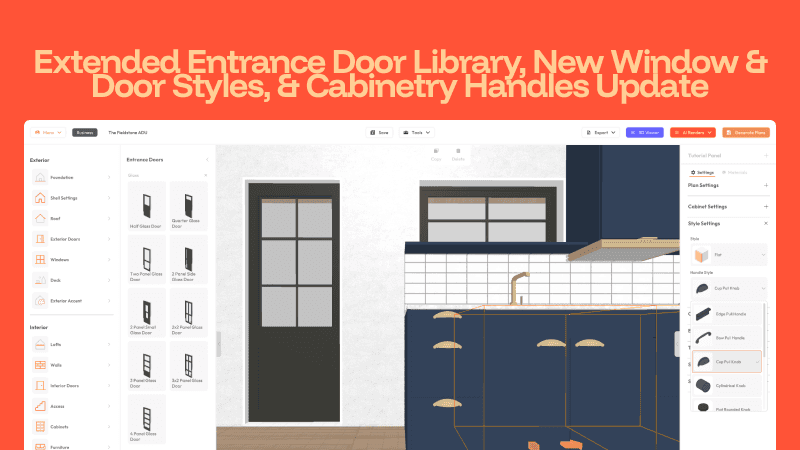
Our latest update focuses on improving design styling accuracy across cabinetry, windows, and exterior doors, so your models better reflect the real products you use in your builds.
Until now, cabinetry hardware, windows, and exterior doors were limited to only a one modern style. This meant many designs looked "close enough", but not true to the actual products you offer or your clients choose.
This update introduces a broader library of door styles, fully custimizable muntins for windows and doors, and an expanded set of cabinetry handle styles.
By extending these tools without adding unnecessary complexity, you can now produce more realistic designs, reduce back-and-forth with clients, and ensure every model feels closer and accurate to the final build.
Open the 3D Tiny House Designer to add your unique styling to your cabinetry, windows and doors.
Added
New Entrance Door Library
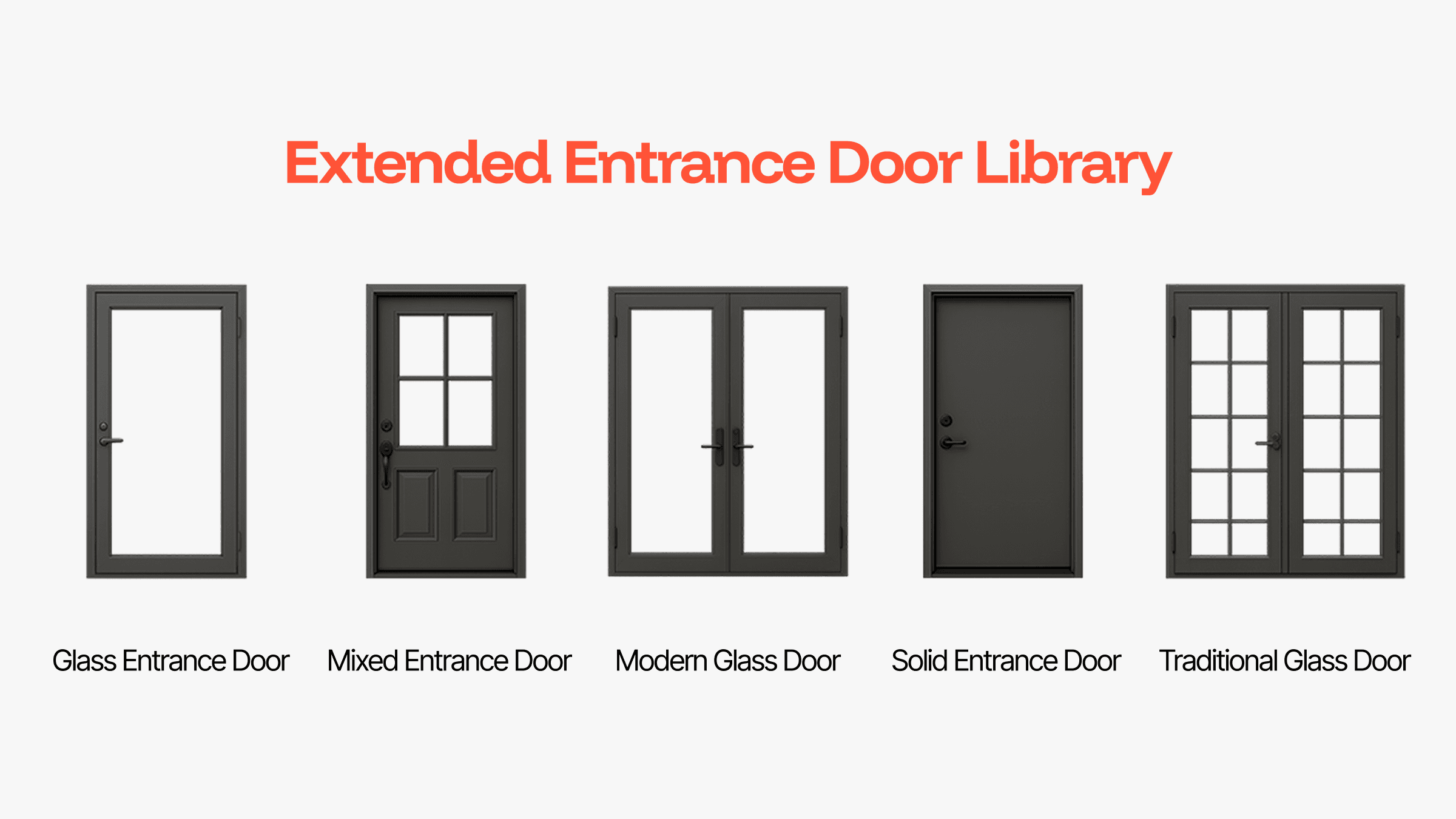
A full range of new entrance door objects has been added to the library, including glass doors, traditional panel doors, and mixed glass–solid styles. You can now choose from a wide selection of preset 3D door leaf designs to match the styles you actually use in your builds. These doors include adjustable trims and new material options for both interior and exterior finishes.
Muntin Controls for Windows & Exterior Doors
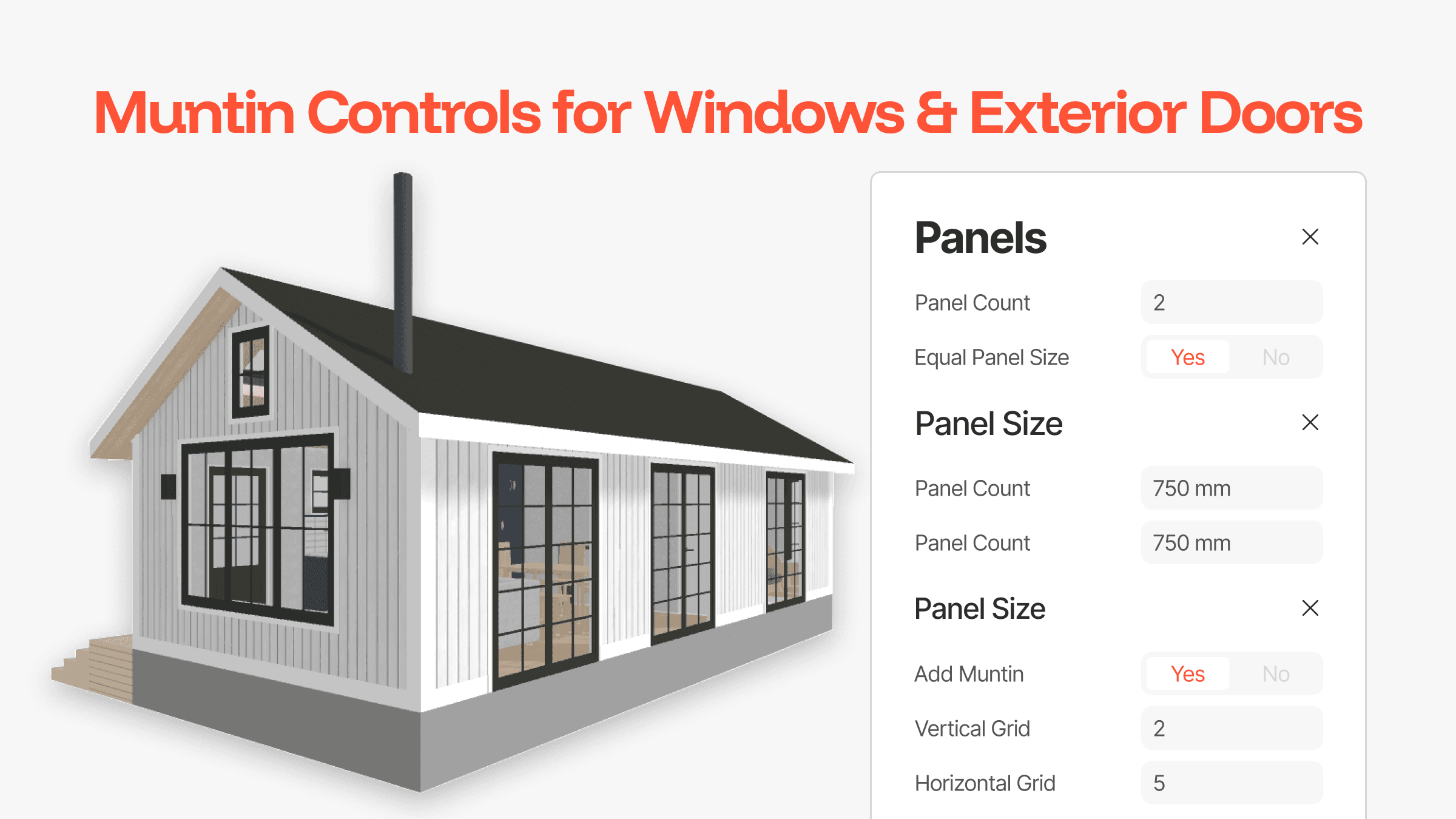
You can now customize the glass panel layout of any standard window or exterior door.
Add muntins
Choose your vertical grid count
Choose your horizontal grid count
Up to a 7×7 grid is supported, allowing you to create anything from modern single-panel glazing to traditional divided-light patterns.
New Cabinetry Handle Styles
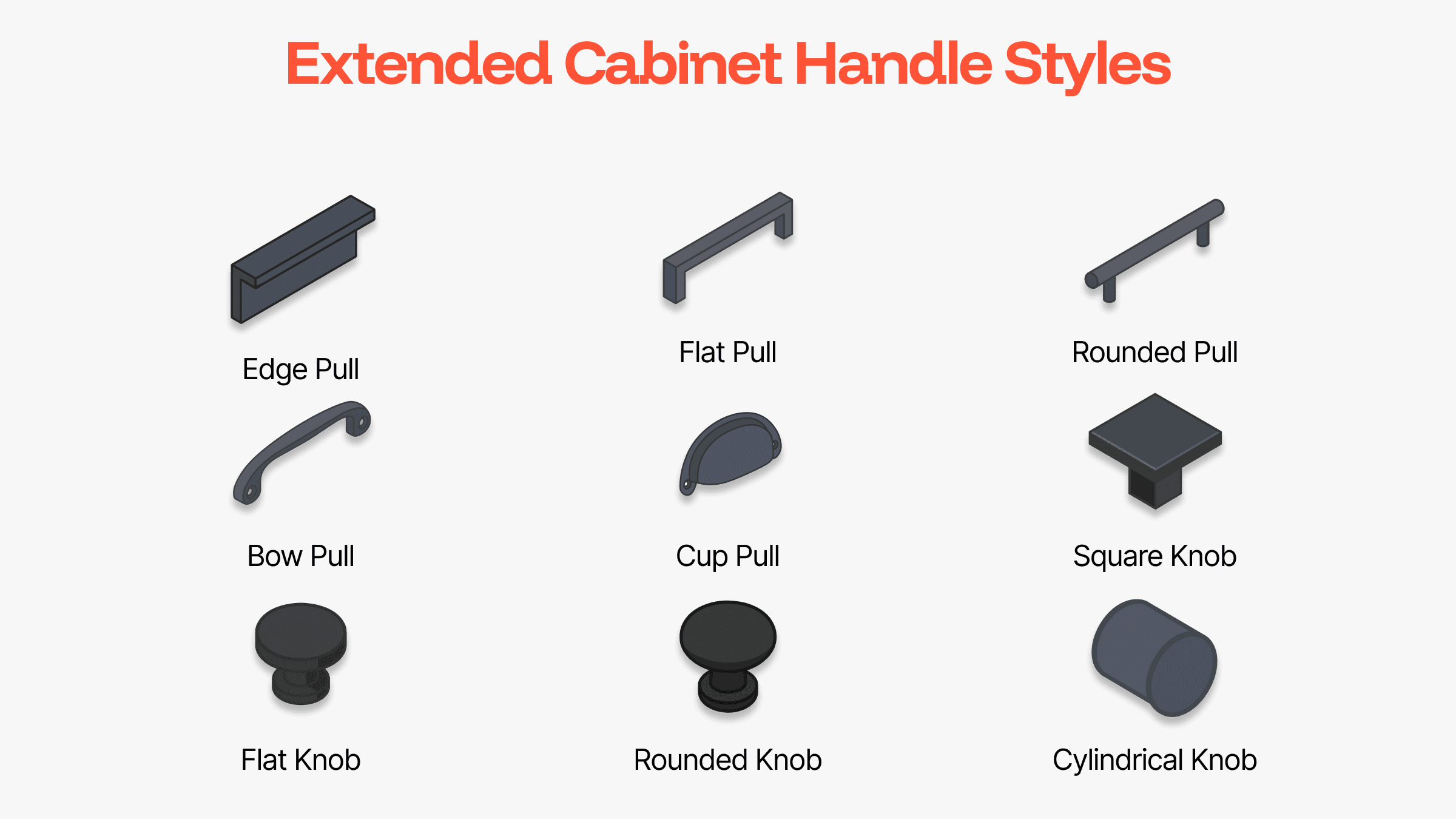
Cabinetry now supports nine new handle and knob styles:
Edge Pull
Rounded Pull
Squared Pull
Bow Pull
Cup Pull
Square Knob
Circular Flat Knob
Circular Rounded Knob
Cylinder Knob
A new Centred position has also been added, and non–edge pulls now automatically inset for more accurate placement.
Improved
Cabinetry Material Separation
Previously, all “hardware” elements of a cabinet: tap, sink, handles were tied to one material. This often resulted in inaccurate representations when clients used mixed finishes.
We’ve introduced two new Master Materials:
Tap (using Hardware material categories)
Sink (using Hardware + Veneer Plywood material categories)
Existing designs are automatically handled through safe file conversion to maintain consistency.
This improvement gives you clearer visual control over cabinetry details while keeping the workflow simple and intuitive.
November 2025 Update | Early Access AI Renders (BETA)
November 17, 2025
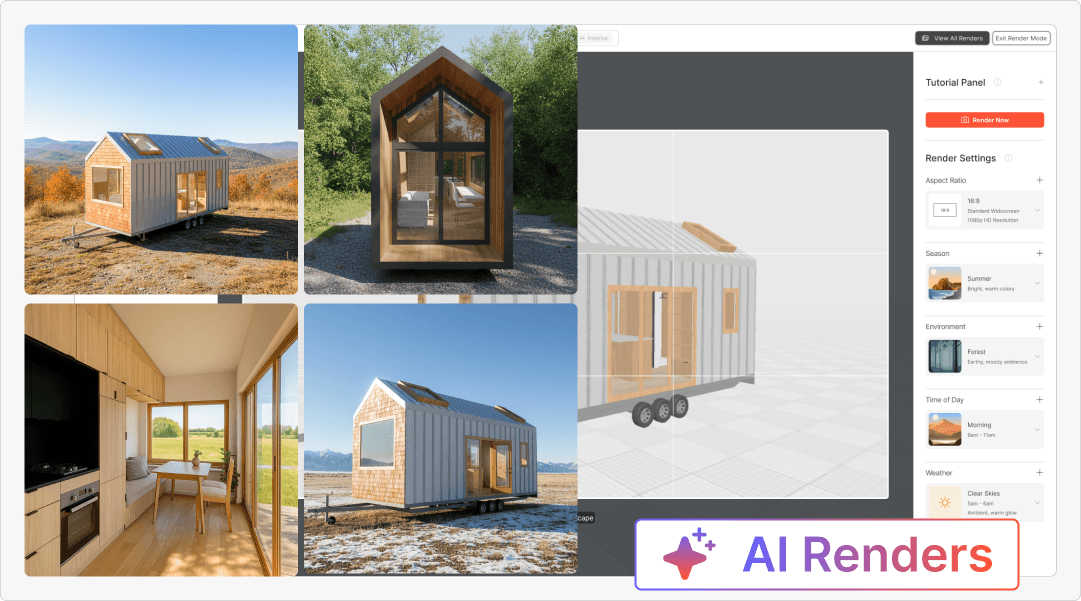
Introducing early access to our AI Renders add-on (BETA) — a powerful new way to generate photo-realistic images of your tiny house designs, instead of hiring a freelancer, or learning a complicated render software.
We rebuilt our Render Tool add-on from the ground up to make rendering faster, more reliable, and most importantly, truly photo-realistic. Our old GPU-based system often produced low-quality results, and suffered from slow, inconsistent performance.
With this new early access of the AI Renders add-on, you can experience our new cloud-based AI generation system. Renders are faster, more realistic, and customizable — You can now select your Aspect Ratio, Season, Environment, Time of Day, and Weather to produce unique images every time.
Plus, your feedback will directly help us improve accuracy and expand capabilities as we refine the tool.
All your renders are automatically saved to your Dashboard, so you can queue multiple shots, step away, and return to find your renders ready to view and download.
If you have an active Business license, we've gifted you some free render tokens for you to use!
Added
Aspect Ratio Options: Choose from 9:16, 16:9, 4:5, 5:4, or 1:1 formats (landscape, portrait & square) to perfectly match your marketing and social media needs.
Environment Settings: Select from multiple backdrops from Forest, Meadows, Mountains, Farmland, Tundra and Outback to match your design aesthetic.
Season Control: Toggle between summer, autumn, winter, or spring to suit your client’s vision or showcase seasonal variations.
Time of Day: Adjust the lighting dynamically with morning, afternoon, or evening settings for natural-looking ambience.
Weather Effects: Add realism with clear skies, overcast, or light rain for more atmospheric renders.
Dashboard Integration: All AI renders are now automatically stored and accessible from your Dashboard — no need to wait in the software or keep it open.
Improved
Render Speed & Reliability: We've replaced our GPU-based render servers with online AI processing — no more waiting hours or worrying about downtime. Your renders are now generated within minutes, directly from the cloud.
Customization Options: Say goodbye to one-size-fits all forest backdrops. With new visual settings for environment, lighting, and time of day, your renders now better match your vision.
Render Interface: Our Render UI has been refreshed for an easier, more intuitive experience — including a camera-grid preview that displays your selected aspect ratio before rendering. You can now frame your shot perfectly without any guess work.
Fixed
Render Notifications: Removed dependency on in-software pop-ups — your renders are now stored safely even if you close your browser.
Ongoing Development
AI Renders (BETA) — Continuous Improvements:
During this early-access phase of AI Renders (BETA), we’re actively refining render accuracy, exterior and interior consistency, and customization settings to ensure every output is high-quality and reliable. As we continue upgrading our AI models and expanding functionality, your feedback plays a crucial role in shaping the next improvements to the tool.Project Management System:
We're building a brand-new Project Management System to give you a more organized, scalable way to manage designs and client projects — all within the Dashboard.
This upcoming update will introduce:Design Templates: Create and manage your staple range of tiny home designs that can be customized, or duplicated for new clients.
Projects: Organize your client work into dedicated projects that can include multiple designs, project notes and client details — keeping everything structured and easy to find.
Archive Designs: Clean up your workspace by archiving old, outdated designs, with the flexibility to access and unarchive whenever needed.
This foundation marks the start of a more efficient, scalable workflow — helping you stay organized as your design library and client base grow.
October 2025 Update: 3DTHD Dashboard
October 15, 2025
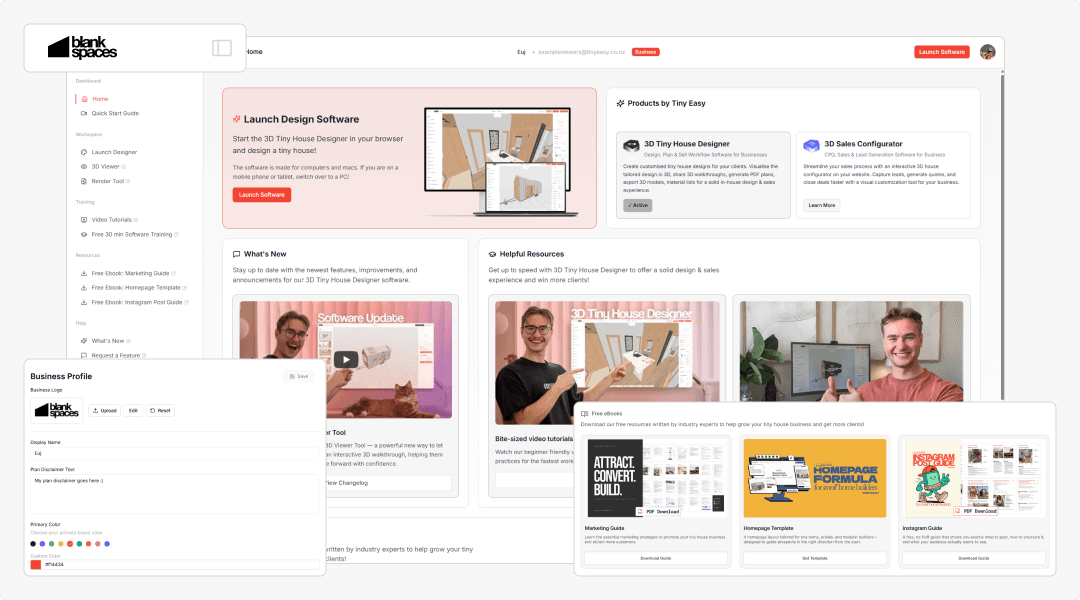
We've launched a major update to your 3D Tiny House Designer Business Dashboard — featuring a brand-new look, improved navigation, and more tools to help you streamline and grow your tiny house business!
The new Dashboard builds the foundation for us to develop your future workspace for effectively managing your projects, when designing & selling your homes.
This update focuses on replacing the old with the new system already adding more functionality, and soon the new tools which will appear in your Dashboard (did I mention AI Renders?)
Added
Custom Branding: Make the Dashboard your own. Personalize your account with your business name, logo, profile photo, and brand color. When showing clients their future tiny home, you can do so, with your flashy in-house software!
Quick Start Guide: This is helpful for new users! A guided setup video series helps you get started and explore the most important features easily. You can revisit this guide anytime if you ever get stuck or need a refresher.
Free Resources: Download eBooks & guides on how to grow your tiny house business with marketing, website design, and social media based on years of learnings of being in the industry and working with hundreds of builders. If you're struggling to acquire new clients, download these resources today for tips & tricks on new strategies to try!
Changelog Section: Stay up to date with the latest software improvements, new features, and tutorials—all accessible right from your dashboard. It will link back right to this page.
Workspace: Here you can access the 3D Designer. Soon you might find your active 3D Viewers, completed AI Renders (update coming soon), and your 3D Sales Configurator directly from your dashboard.
Improved
Complete UI Refresh: A cleaner, more intuitive interface for a smoother and faster workflow
Simplified Navigation: Better layout for easier access to tools and key areas.
Device Scaling: The dashboard now scales perfectly across different screen sizes for a smoother experience.
Fixed
Broken Links: All outdate or broken links have been fixed to ensure everything is up to date and easily accessible.
Ongoing Development
AI Renders: We're now working on our next big release. AI Renders!
As you might now, we already have a Render Tool. However, we've listened to your feedback, asking for more realistic, lifelike renders. AI Renders harness the power of generative AI to create realistic images of your tiny home designs, showcasing stunning materials, changeable landscape backgrounds, time of day, weather, and much more!
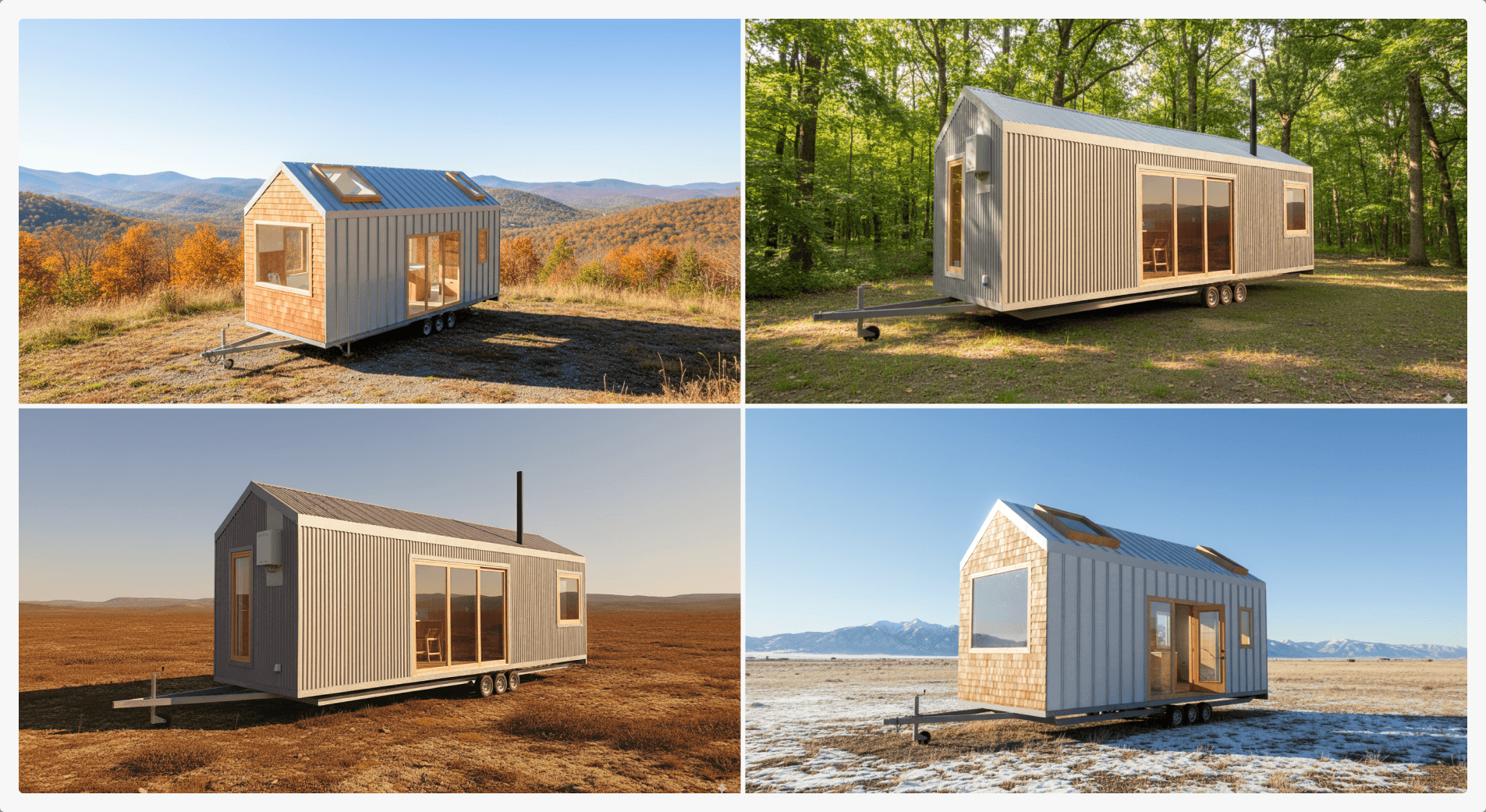
This new feature will help you produce professional images that your clients can easily understand, to fall in love with their future home! Here's a sneak peek preview of a few renders we have already created with our work in progress tool:
July 2025 Update: 3D Viewer Tool
July 10, 2025
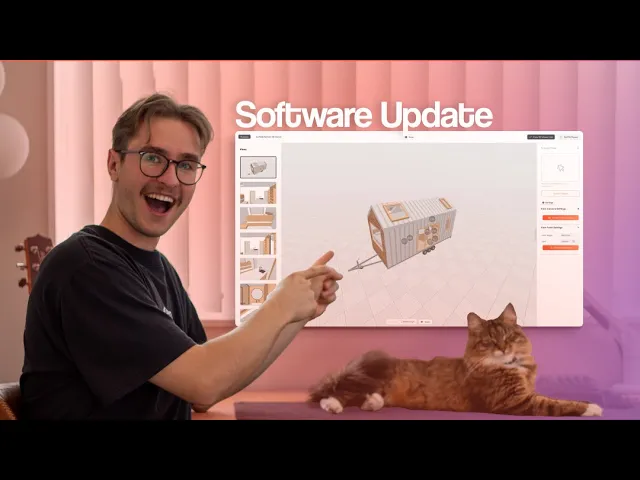
The July Update introduces the 3D Viewer Tool — a powerful new way to showcase and share your tiny home designs. Let clients explore custom projects or staple models in an interactive 3D walkthrough, helping them visualize, self-educate, and move forward with confidence. Share designs via a link or embed them directly on your website.
Alongside this new feature, we've added isometric interior plans, advanced window and door controls, a rebuilt shell system for more complex shapes, and major performance improvements. See the full changelog below.
Added
Interior Isometric Plans
Showcase your designs in 3D isometric perspective—great for visualizing interior layouts with depth.Advanced Window & Door Settings
Gain precise control over:Trim Size
Reveal Size
Panel Size
Exterior Trim
Also includes improved material overides for better customization
Contextual Tutorial Links
Every property panel now links directly to a relevant tutorial—for example, editing a window gives you quick access to the window and door video tutorial.Overhauled Shell Generation System
We've rebuilt how floors, walls, and roofs are generated. This lays the foundation for future support of wing walls, angled shapes, and more complex layouts.
Improved
More Accurate Floorplan & Elevation Dimensions
Cleaner and more consistent dimensioning throughout PDF plans.Smarter Skylight Behavior
Skylights now follow the slope of the roof panel they’re placed on.Per-Roof Custom Settings
Set individual roof properties instead of relying on global roof settings.Improved Wall-to-Roof Connections
Cleaner geometry and better attachment for both interior and exterior walls.Optimized App Size
50% smaller file size = faster load times.Improved Texture Quality
Smoother, more realistic rendering—especially for timber grain textures.Cleaner URLs
The designer now loads from:designer.tinyeasy.co
Fixed
Fixed duplicate furniture/cabinet issue when copying designs.
Resolved material overrides resetting on reload.
Fixed unexpected camera resets when toggling orbit/walkthrough views.
Dimensions now remain consistent after editing saved designs.
Plus various minor fixes and stability upgrades.