Changelog
July 2026 Update: Configurator Inbox + Configurator AI Renders
July 15, 2026

We have released two major additions for 3D Configurator customers:
Configurator Inbox for managing submitted configuration inquiries inside the Tiny Easy Dashboard
Configurator AI Renders for turning submitted configurations into stronger, sales-ready images
Together, these features help connect the journey from a visitor configuring a home on your website to your team following up, visualizing their selected design, and progressing the enquiry into a Project.
At a glance:
This update includes:
A dedicated Configurator Inbox inside the Tiny Easy Dashboard
A clearer view of every submitted Configuration Inquiry
Customer details, selected options, pricing information, and pre-qualifying answers in one place
The ability to connect Configuration Inquiries with Projects, Designs, Proposals, and AI Renders
New Configurator AI Renders, available as an optional additional subscription
A guided rollout for existing Configurator customers
Added
Configurator Inbox
Every completed 3D Configurator journey creates valuable sales context.
A customer may have explored a specific model, selected layouts, materials, upgrades, and options, answered your pre-qualifying questions, and shared their contact details. Until now, much of that information has typically been handled through individual enquiry notifications to your email inbox, or is pushed into your CRM.
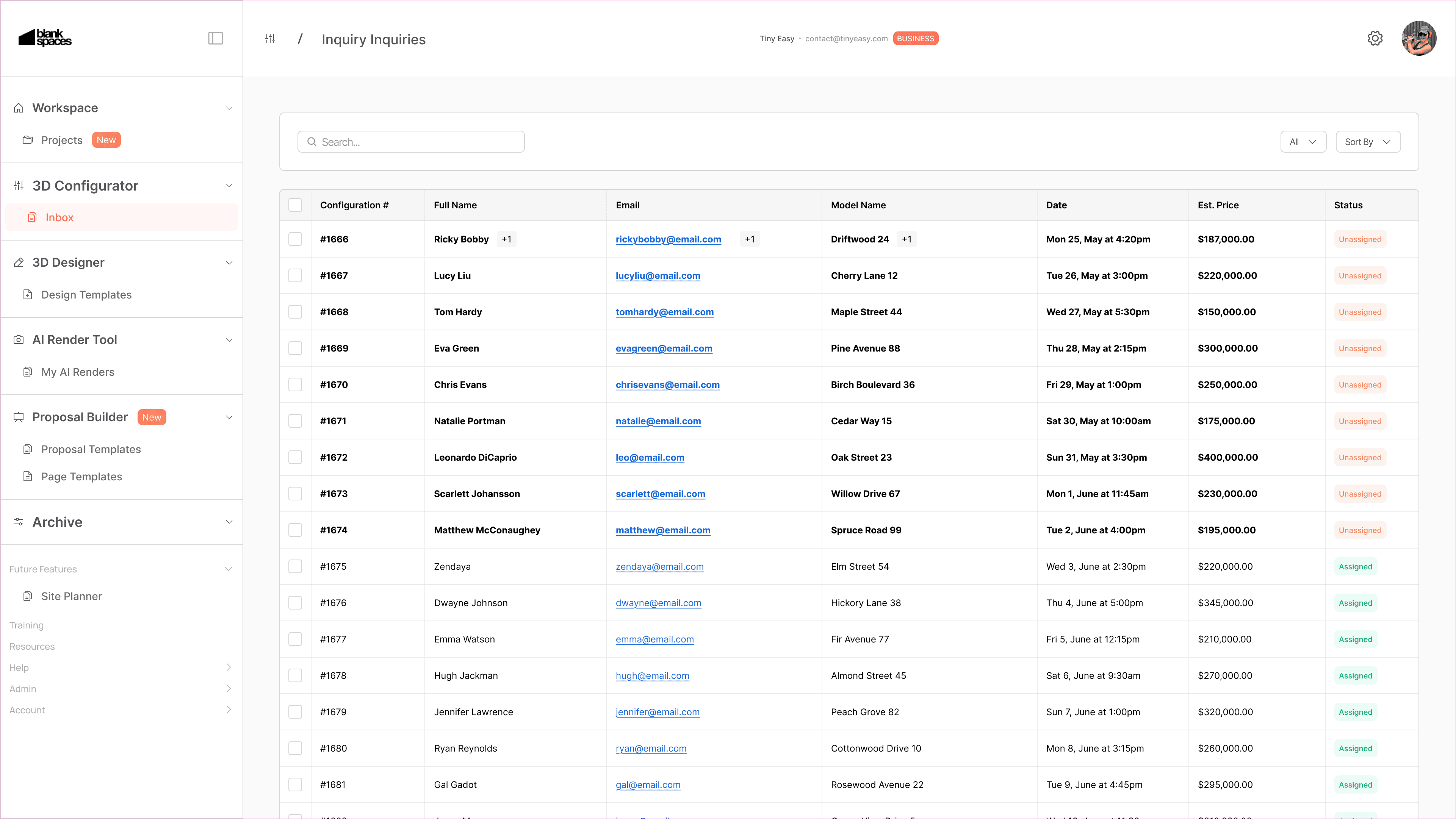
The new Configurator Inbox gives you a new dedicated place in the Tiny Easy Dashboard to review and manage those submitted Configuration Inquiries.
For each inquiry, your team can see the information submitted by the customer in one structured view, including:
Customer contact details
The model or configuration they submitted
Their selected layouts, materials, upgrades, and options
Pricing information, where pricing is enabled for your Configurator
Answers to your pre-qualifying questions
Any additional information supplied through your enquiry form
Configuration Inquiries can now become part of a Project
The Configurator Inbox is designed to work closely with the new Project Workspace.
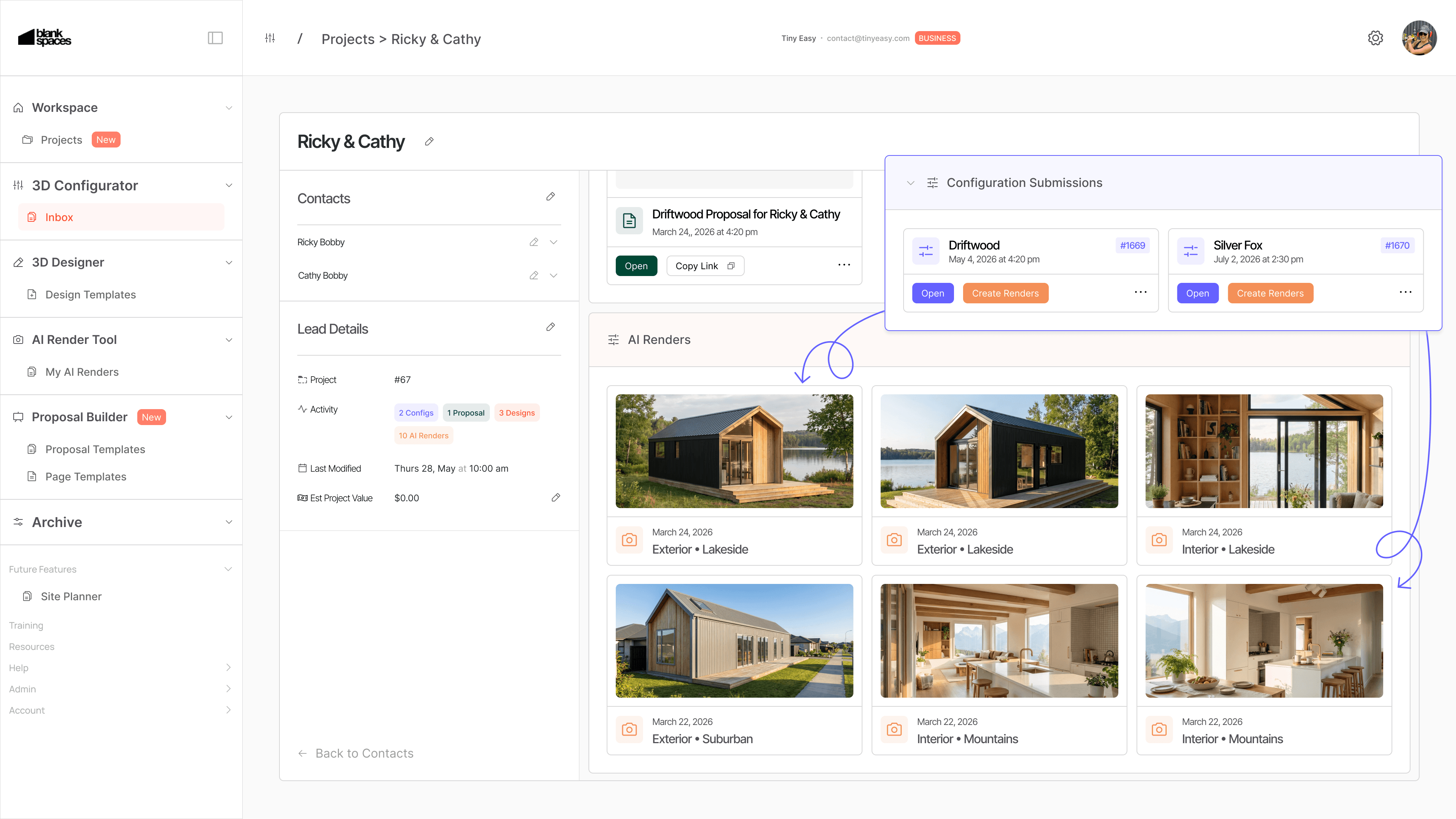
When an enquiry develops into an active opportunity, you can connect the Configuration Inquiry to a dedicated customer Project.
From there, the Project can become the shared place for the work that follows, including:
The original Configuration Inquiries
Custom 3D Designs
AI Renders
Proposals
Future revisions and related resources
This creates a clearer path from the first website interaction through to a custom design, proposal, and next steps.
For businesses using both the 3D Configurator and 3D Designer, this helps bridge the gap between inbound sales enquiries and the more detailed design work that often follows.

Configurator AI Renders
We have also introduced AI Renders for the 3D Configurator.
Configurator AI Renders allow you to turn a submitted customer configuration into polished visual content that helps them better understand the home they have configured.
Rather than following up with only a list of selected options or a specification summary, you can use AI Renders to create a more compelling visual conversation around the customer’s chosen design direction.
This can be especially useful when a customer has selected specific, exterior finishes, materials, layout options, upgrades and styling choices.
AI Renders can help you:
Create more engaging follow-up material for serious enquiries
Bring a configured home to life visually
Support conversations around materials, finishes, and design direction
Give customers a stronger sense of what they are working toward
Create more polished visuals for sales conversations and proposals
AI Renders are particularly useful when a customer is interested, but still needs greater confidence before taking the next step.
Guided rollout for existing Configurator customers
We are rolling out the Configurator Inbox through short personal walkthroughs with existing Configurator customers.
This allows us to help you set up the feature around your current sales process, answer questions directly, and learn from how your team manages real enquiries.
During the walkthrough, we can cover:
How to review and manage Configuration Inquiries
How Configuration Inquiries connect to Projects
How the Inbox fits alongside your current email, CRM, or sales process
How Configurator AI Renders can support your follow-up workflow
The Configurator Inbox will be activated for your account following this walkthrough.
Configurator AI Renders are an optional add-on
Configurator AI Renders are available as an additional subscription module for Configurator customers.
The add-on module is designed for businesses that want to turn submitted configurations into stronger sales visuals and create a more visual follow-up experience for potential customers.
If you would like to see how this could work for your models and sales process, talk to to us and we can walk you through it personally.
From a configuration submission to a connected customer workflow
The 3D Configurator has always been designed to help website visitors explore your homes, understand their options, and submit more informed enquiries.
This update builds on that foundation.
The Configurator Inbox gives your team a clearer place to receive and understand those enquiries. Project Workspace allows that information to stay connected as the customer moves into custom design, renders, and proposals. Configurator AI Renders add a more visual way to continue the conversation.
Together, these tools create a more connected workflow:
Configure → Submit Inquiry → Review → Visualise → Design → Propose
This is an important step in building a more practical sales and design system for businesses selling tiny homes, ADUs, cabins, prefab spaces, and other small homes.
Book your walkthrough to unlock Configurator Inbox
Want to see the Configurator Inbox and Configurator AI Renders in action?
Book a personal walkthrough. We will show you how the new workflow fits around your existing Configurator, sales process, and customer journey, and activate your Configurator Inbox after the call!
Book a Walkthrough: https://calendly.com/tinyeasy/personal-meeting-w-till