Changelog
October 2026 Update: Introducing Proposal Builder Module
October 12, 2026

We’ve launched Proposal Builder, a new Tiny Easy module designed specifically for the way home builders sell.
Most builders already have a way of creating proposals. It might be Word, Canva, Google Docs, quoting software, PDFs, or a mix of a few different tools.
The problem isn’t that those tools can’t make a proposal.
It’s that the proposal often sits separately from the project you’re actually selling, is time consuming, and hard to put together a nice looking document.
Your floorplans might be in one place. Renders somewhere else. Your quote comes from another system. Then there are specifications, inclusions, warranties, company information, terms, testimonials and all the other pieces your customer needs to understand before they can take the next step.
Proposal Builder brings those pieces together inside the same Tiny Easy Project you’re already using to configure, design and sell the home.
Create your proposal system once, reuse it across future projects, then tailor each proposal to the individual customer.
The result is a faster, more repeatable way to create professional sales proposals without rebuilding the entire document every time.
At a glance
With Proposal Builder, you can:
Create professional proposals with a visual drag-and-drop Editor
Set up your business branding once, use it throughout your proposals and update it easily when you need to
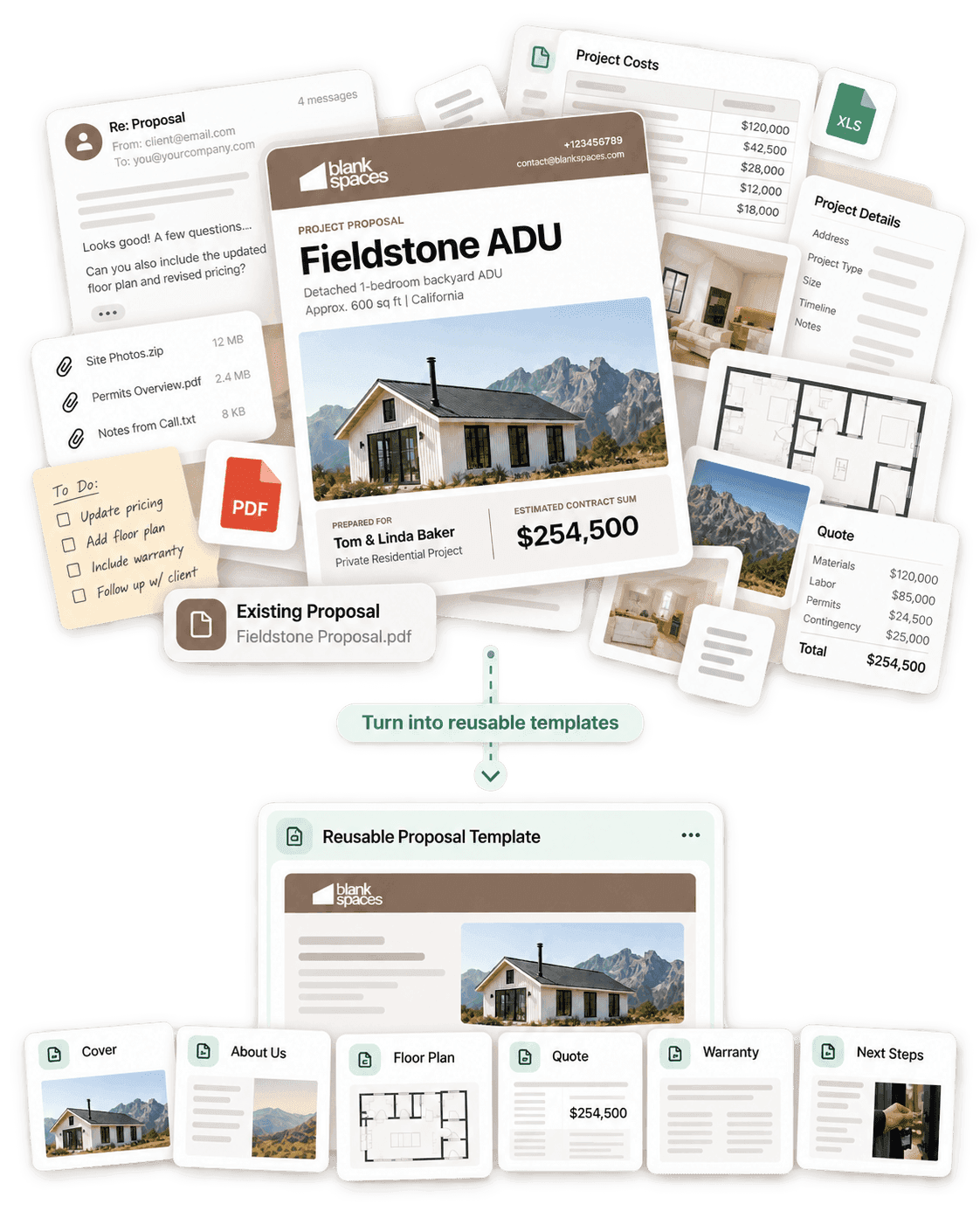
Create reusable Proposal Templates for the types of projects you regularly sell
Build reusable Page Templates for common proposal content
Keep important company content connected using Synced Page Templates
Tailor each proposal around the individual customer and project
Add floorplans, images, renders and project information
Embed interactive 3D Viewer and 3D Configurator experiences made with Tiny Easy
Present specifications, inclusions and pricing
Embed PDF quotes from your existing quoting or estimating software
Add Calls To Action that guide customers toward their next step
Preview proposals across desktop, laptop and mobile screen sizes
Check for unfinished content before sending
Set proposal expiry dates
Send customers a professional web-based proposal with its own shareable link
Keep Sent proposals locked and create new revisions when something changes
Watch the "Getting Started" tutorial below, to get an overview of Proposal Builder!
Added
Bring the proposal into your Tiny Easy sales workflow
Proposal Builder lives directly inside your customer Projects.
A customer may have first configured one of your homes through the 3D Configurator.
Your team might then create a more tailored design using the 3D Designer, generate AI Renders, prepare floorplans or work through other parts of the project with them.
Proposal Builder gives you a place to bring that information together into the customer-facing sales document.
That proposal could be used early in the process to present a concept or preliminary estimate, or later in the sale when the customer is closer to making a decision.
The important part is that you don’t need to leave the project and start piecing everything back together in another disconnected document tool.
Your sales workflow can continue inside Tiny Easy:
Configure → Design → Visualise → Propose → Next Step

Turn your proposal process into a reusable system
The real time saving comes before you even start the next customer proposal.
Rather than treating every proposal as a completely new document, Proposal Builder lets you build the common parts of your sales process and reuse them.

There are three main pieces.
1. Your business branding
Set up your:
Logo
Brand colours
Fonts
Button styling
Business information
These settings create the visual foundation for Proposal Builder and carry across the proposals your team creates.
Instead of manually restyling every document, your proposals begin with the same consistent business branding.
2. Proposal Templates
Proposal Templates give your team a reusable starting point for an entire proposal.
You might create different templates for:
A standard model sale
A custom design project
A preliminary estimate
A multi-unit project
Different home ranges
Different stages of your sales process
The template can already contain the chapters, pages and standard information your team normally needs.
When it’s time to prepare a customer proposal, you start with the template that best matches the project rather than an empty document.
3. Page Templates
You can also create individual Page Templates for content you regularly use across different proposals.
That might include:
About Us
Your building process
Testimonials
Standard inclusions
Warranty information
Terms and conditions
Project overview pages
Pricing pages
Image galleries
3D walkthroughs
Next steps
There are two ways these pages can work.
A Regular Page Template gives you reusable starting content that can then be changed specifically for that customer.
A Synced Page Template stays connected to one centrally managed page.
For example, you might customise the Project Scope for every customer, while keeping your standard Warranty or building process synced across your business.
If that shared information changes, you can update the source rather than hunting through all of your templates and Draft proposals to replace it manually.
We can help build your templates for you
Already have proposals your business has spent years developing?
You don’t need to throw them out and start again.
As part of getting started with Proposal Builder, you can send us examples of the proposals, brochures or sales documents you currently use.
We can help turn your existing branding, messaging and sales content into reusable Proposal Templates and Page Templates inside Tiny Easy.
You show us how you sell today. We help turn it into a repeatable system inside Tiny Easy.
From there, your team can continue editing, expanding and creating new templates as your sales process evolves.
Build visually with the Proposal Editor
Proposal Builder gives you a visual Editor for creating and customising your documents.
Proposals are organised into Chapters and Pages, helping larger proposals stay easy to manage.
Inside each page, you can add and arrange pre-styled Elements depending on what you need to communicate.
That means you can create pages containing text, imagery, project details, pricing, Calls To Action, 3D experiences and other sales information without manually designing every page from scratch.
Pages can be added, removed, duplicated and rearranged as needed.
The template gives you the starting point. You still control the story you want to tell.

Tailor the proposal to each customer
When you’re ready to prepare a proposal, open the relevant customer Project and select the Proposal Template that best fits their situation.
Your standard structure is already there.
Now your time can go into the pieces that actually need to be specific to the customer.
You might update:
Their name and project information
The model they’re interested in
Project location
Tailored introductory messaging
Design details
Floorplans
3D Walkthroughs
Specifications and inclusions
Pricing
Customer-specific terms
The next step you want them to take
You can add or remove pages depending on the project, and rearrange the proposal until the information follows the right story for that customer.
The goal isn’t to make every proposal identical. It’s to stop rebuilding the parts that don’t need to be different.

Show customers what they’re actually buying
Selling a home is visual.
Customers need to understand more than a written specification or final price. They want to see the floorplan, understand how the home looks and get a clear picture of what is actually being offered.
Proposal Builder lets you include visual project content directly alongside the commercial information.
You can add:
Exterior and interior renders
Floorplans
Elevations
Site imagery
Material selections
Photography
Design details
Image galleries
If you’ve created an interactive design in the 3D Designer, you can also embed the 3D Viewer directly into the proposal.
For projects coming through the 3D Configurator, you can embed a Configurator experience, including the customer’s submitted configuration where relevant.
Instead of sending a proposal PDF, a folder of renders and a separate 3D link, you can bring the project experience together into one place.
Present specifications, pricing and quotes
Proposal Builder also gives you flexibility around the commercial side of the project.
You can use built-in Elements to present information such as:
Specifications
Standard inclusions
Materials
Appliances and fixtures
Project scope
Site assumptions
Pricing
Optional items
If your business already produces quotes using accounting, estimating or project management software, you don’t need to replace that workflow.
Simply upload the PDF using the Embedded Quote Element.
Your existing software can continue handling the formal quote, while Proposal Builder becomes the main customer-facing document that packages it alongside everything else they need to understand the project.
Give your customer a clear next step
A proposal shouldn’t simply reach the final page and leave the customer wondering what happens now.
You can add Call To Action buttons throughout your proposal that link to the next step in your existing sales process.
For example:
Book Your Design Meeting
Pay Your Deposit
Continue to Contract
Complete a Form
Contact Our Team
When you finalise the proposal, you can also enable a persistent Call To Action bar that stays visible while the customer moves through the document.
That keeps the action you want them to take within reach instead of burying it somewhere on the final page.
Proposal Builder itself does not act as a legally binding acceptance or electronic signature system.
If your customer needs to formally accept an agreement or sign a contract, your Call To Action can direct them to the external system or process your business already uses.
Review everything before it goes out
Once you’ve finished tailoring the proposal, you can preview the complete document from the customer’s perspective.
Check that:
Customer and project information is correct
Placeholder content has been replaced
The right floorplans, images and renders are being shown
Pricing and quotes are accurate
Pages appear in the right order
Buttons point to the right place
The complete proposal feels clear and easy to follow
Proposal Builder also flags incomplete Elements before the document can be finalised, helping catch those annoying blank images or unfinished sections before they reach the customer.
You can also switch between Desktop, Laptop and Mobile views while editing to check how the proposal responds across different screen sizes.
Because there’s a very good chance your carefully crafted proposal will first be opened on someone’s phone.
Finalise and send
When your proposal is ready, open the Send window.
From here, you can:
Resolve any remaining incomplete content
Set the Proposal Due Date
Enable a persistent Call To Action if required
Finalise the customer-facing proposal
Once you select Share Proposal, the editable Draft becomes a Sent Proposal.
Tiny Easy creates a customer-facing web version with its own shareable link, which you can send through whichever communication channel already works for your business.
That might be email, your CRM, a text message or another customer communication tool.
The Proposal displays when it was sent and when it expires, along with any Calls To Action you’ve added.
Most importantly, the Sent Proposal is locked.
The customer continues seeing the exact version you originally sent rather than a live document that could change underneath them.

Easily create proposal revisions
Of course, home sales don’t usually end with Proposal Version 1.
A customer might want to change the design, adjust an inclusion, update the pricing or move into the next stage of their project.
Rather than editing the Proposal you already sent, duplicate it to create a new Draft.
Make the required changes, review the updated version and send it again.
You now have the original Sent Proposal and the updated Sent Proposal as separate records inside the Project.
This gives you a simple way to handle revisions while keeping a clear history of what was actually presented to the customer.
And when a Proposal should no longer be accessible, it can be Archived.
Ready to try Proposal Builder?
Proposal Builder is now available to existing Tiny Easy customers, with plans starting from $25/month.
During our launch, existing customers can also get their first month completely free, including hands-on onboarding where we can help turn your current sales documents into polished, reusable Proposal Builder templates.
[Get Started With Proposal Builder →]
Or, if you’d like to see how Proposal Builder could work around your current sales process: