Changelog
July 15, 2026: Project Workspace 2.0
July 15, 2026

We have released a major update to the Tiny Easy Dashboard, designed to make it easier to manage each customer from their first inquiry through to design, visuals and proposals.
With Project Workspace 2.0, the information and resources related to one customer can now stay connected within the same Project. We have also introduced a more condensed Project List View, made Projects unlimited across every 3D Designer plan, and improved how archived Designs remain connected to their original Project.
For existing 3D Designer customers, this update also completes the temporary capacity transition introduced in March 2026. From 14 July 2026, Active Design and Design Template capacity is based on the subscription tier currently attached to your account, while Projects remain unlimited.
At a glance
This update includes:
Project Workspace 2.0, bringing all customer-related resources into one place
Configuration Inquiries, 3D Designs, Proposals and AI Renders connected within Projects
A new condensed Project List View for scanning and managing more Projects
Unlimited Projects across every 3D Designer subscription tier
3D Designer capacity measured using Active Designs and Design Templates only
Improved archiving, allowing archived Designs to remain connected to their original Project
Existing customer capacity moving from the temporary transition allowance to the capacity included in their current subscription tier
Watch the full update walkthrough
Added
Project Workspace 2.0
A customer Project often includes much more than a single design file.
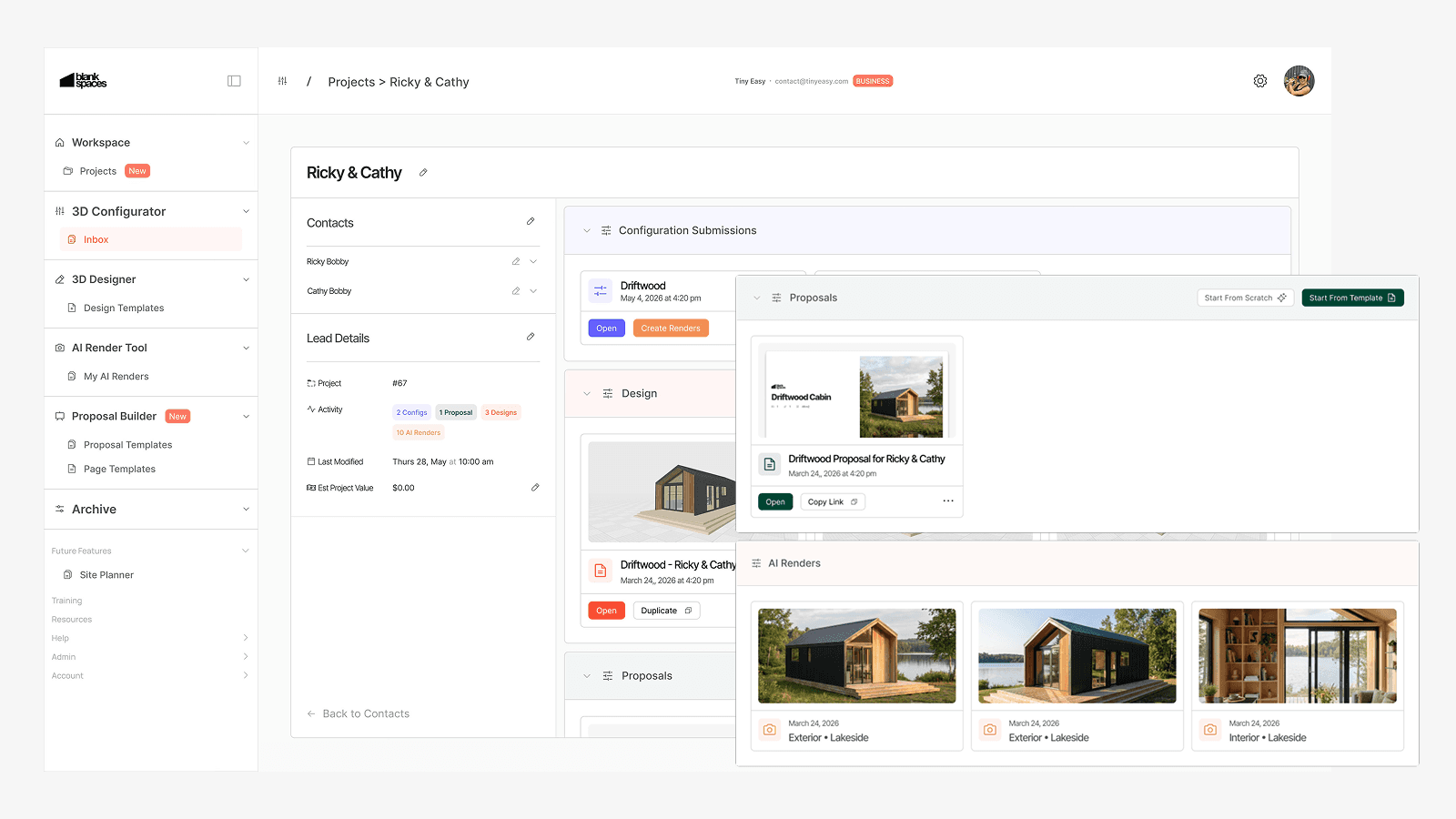
It may begin with a Configuration Inquiry submitted through your website. From there, the customer may move into a custom 3D Design, explore several variations, request AI Renders, receive a Proposal and continue through your wider sales and design process.
Previously, these resources could live across separate areas of the Dashboard. Project Workspace 2.0 gives them one shared home.
Within a Project, you can now connect:
Configuration Inquiries
3D Designs
Proposals
AI Renders
This gives your team a clearer view of the work completed for each customer without needing to piece together information from several areas of Tiny Easy.
Whether you use one Tiny Easy module or combine several modules across your workflow, Projects now act as the central workspace connecting the relevant customer information.
Related update for 3D Configurator customers
We have also released Configurator Inbox, giving your team a dedicated place to review submitted configurations, customer details, selected options, pricing and pre-qualifying answers inside the Tiny Easy Dashboard. The update also introduces optional Configurator AI Renders, allowing you to turn submitted configurations into polished visuals for customer follow-up.
Read the full Configurator Inbox + Configurator AI Renders changelog.
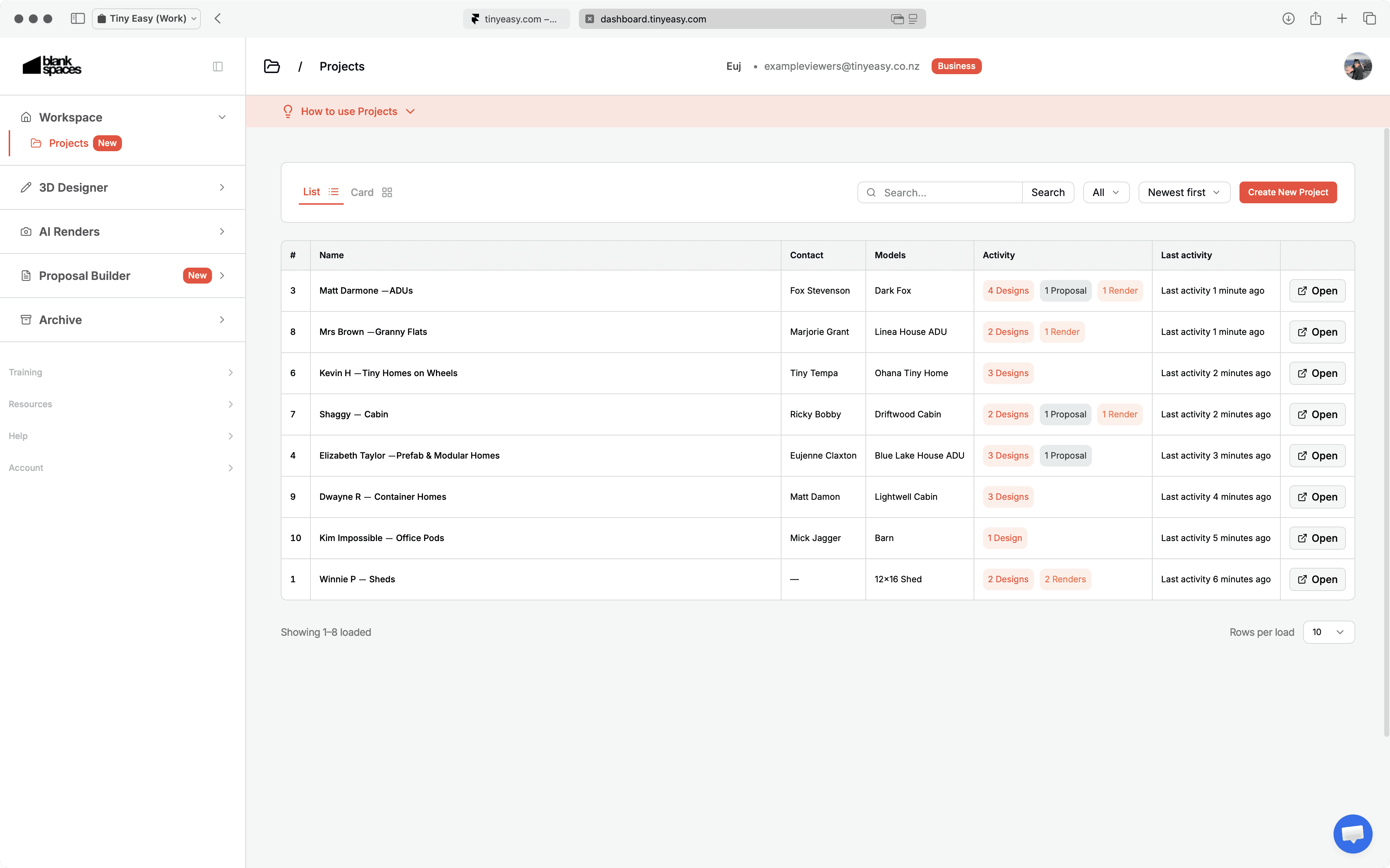
New condensed Project List View
As your business grows, so does the number of leads, customers, revisions and jobs moving through your workflow.
The new condensed Project List View gives you a more compact way to scan, search and open Projects from the Dashboard. It reduces the amount of scrolling required and makes it easier to find the right customer or job when you are managing a larger workspace.
This view is especially useful for businesses that:
Manage a growing number of inquiries and active customers
Use multiple Tiny Easy modules
Create many Projects each month
Need a clearer overview of ongoing sales and design work
Improved
Unlimited Projects across every 3D Designer plan
We have simplified the way 3D Designer capacity works.
Previously, subscription plans included separate limits for:
Active Projects
Active Designs
Design Templates
With this update, Projects are unlimited across every 3D Designer plan.
Your subscription tier now determines only:
The number of Active Designs you can work on at the same time
The number of Design Templates you can keep active
This gives you more freedom to create a Project for every relevant lead, client, completed job or future opportunity without using capacity simply because the Project exists.
You can also decide how your Active Design capacity is distributed. One customer may need several active design variations, while another Project may only contain one Active Design, a Proposal, AI Renders or an archived reference Design.
New 3D Designer capacity
Plan | Active Designs | Design Templates | Projects |
|---|---|---|---|
Starter | 2 | 3 | Unlimited |
Basic | 6 | 5 | Unlimited |
Growth | 12 | 7 | Unlimited |
Scale | 20 | 9 | Unlimited |
Pro | 40 | 15 | Unlimited |
Custom | Tailored | Tailored | Unlimited |
You can view the latest plan details on our Pricing Page.
Why we made this change
A separate Project limit did not always reflect the amount of active design work a business was completing.
For example, one customer may need several active Designs while another Project may only require one Design, a Proposal and a few Renders. Under the previous structure, both Projects used capacity even though the amount of active design work was very different.
The updated model is based more closely on where work is actively happening:
Create a Project for every relevant lead or customer
Keep several Designs within one Project where needed
Use Active Design capacity for work currently being edited
Archive inactive Designs while retaining their connection to the customer project.
Archived Designs can remain connected to their Project
Design archiving is now more useful within the wider customer workflow.
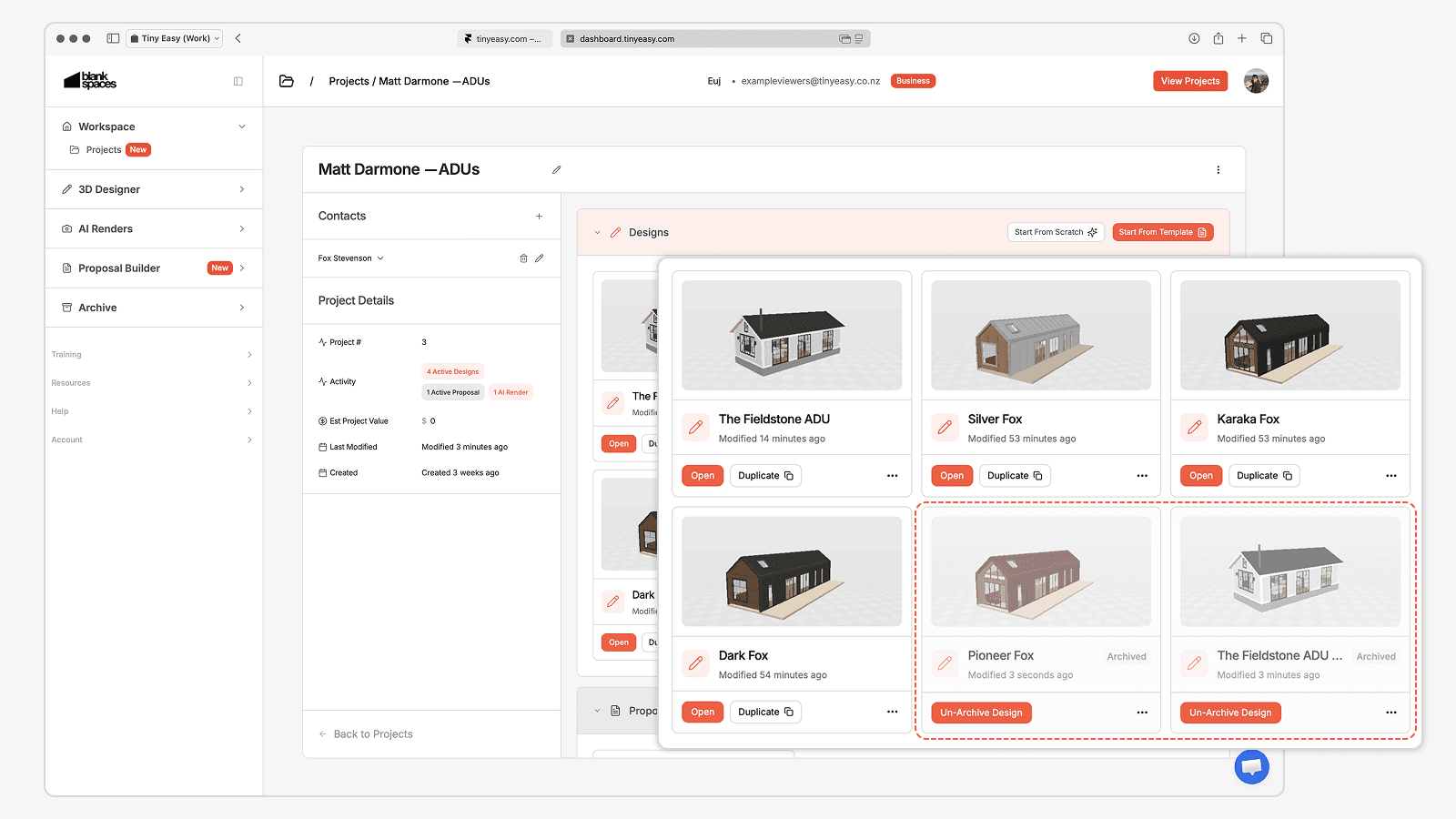
When you archive a Design, it can remain visible within its original Project as a greyed-out archived item. This preserves the history of the Project while freeing an Active Design slot for new work.
For example, a customer may explore several layouts before choosing one final direction. Instead of removing the unused concepts from the Project, you can archive those earlier variations and keep them attached as part of the customer history.
What to know before archiving
Archived Designs do not count toward your Active Design capacity
The archived Design can remain visible within its related Project
Archived Designs cannot be opened in the 3D Designer while inactive
Any attached 3D Viewers become inactive while the Design is archived
You can restore an individual archived Design once every 30 days
This makes it easier to keep your active workspace focused without losing the context of how a customer Project developed.
Capacity transition for existing 3D Designer customers
When we introduced the first version of Project Workspace and the updated 3D Designer subscription structure in March 2026, we temporarily gave existing customers the capacity of the next plan tier at no additional cost.
For example, a customer subscribed to the Basic plan temporarily received the capacity included in the Growth plan.
This temporary allowance gave customers more room to organise their workspace while we observed how Projects, Designs and Templates were being used in real business workflows. What we learned helped shape the more flexible structure introduced with Project Workspace 2.0.
From 14 July 2026, existing customer accounts reflect the Active Design and Design Template capacity included in their current subscription tier.
What is changing
Active Design capacity is based on your current 3D Designer plan
Design Template capacity is based on your current 3D Designer plan
The temporary next-tier capacity provided during the transition has ended
What is not changing
Projects are unlimited across every plan
Archived Designs do not use Active Design capacity
Do you need to take action?
No action is needed where your current Active Design and Design Template usage fits within the capacity included in your plan.
If your workspace currently contains more active items than your plan includes, we recommend reviewing your Designs and Templates and archiving anything that is no longer being actively worked on. You may need to free capacity before creating or restoring additional active work.
You can also move to a higher 3D Designer tier where your business regularly needs more Active Designs or Design Templates available at the same time.
Recommended workspace review
Take a few minutes to:
Archive Designs that are no longer actively being edited
Keep earlier design variations connected to their Project as archived references
Review your Design Templates and retain the models your team actively uses
Check that your current plan matches the amount of simultaneous design work your business manages
Our team can help you review your workspace and identify the most practical setup for your workflow.
Building a more connected Tiny Easy workflow
Project Workspace 2.0 is another step toward making Tiny Easy a more connected place to manage your sales, design, visualisation and proposal workflow.
Instead of treating each module as a separate destination, we are building a system where the information around a customer can remain connected as their Project progresses.
Need help reviewing your workspace or understanding your plan capacity?