Compare
Compare IdeaRoom and Tiny Easy on building types, 3D configuration, sales follow-up, checkout and pricing to choose the right fit for your business.

Giving customers the ability to explore and customize buildings directly on your website can make a big difference to how you sell. Instead of relying on static images, floor plans, and lengthy email conversations, customers can explore your building range in 3D, select their preferred options, and understand what their choices might cost.
IdeaRoom and Tiny Easy both offer 3D configurator software designed to help building businesses create this experience.
While they share similarities, the platforms have different areas of specialization. IdeaRoom focuses on sheds, carports, and structural buildings, with tools for managing building configurations, pricing, and orders. Tiny Easy focuses on small-home builders, connecting customer configuration with design, visualization, and proposal workflows.
These differences extend beyond the types of buildings each platform supports. They also influence how businesses manage their model range, present customization options, and move customers through the sales process.
In this comparison, we'll look at how IdeaRoom and Tiny Easy work, their main features, pricing, and how they fit into different building businesses to help you decide which platform suits your needs.
IdeaRoom vs Tiny Easy at a Glance
Both platforms allow building businesses to create interactive 3D buying experiences, but their features and workflows reflect different industry requirements.
Here's a quick overview of how they compare.
Feature | IdeaRoom | Tiny Easy |
|---|---|---|
Best suited for | Sheds, carports, post-frame and red iron buildings | ADUs, tiny homes, cabins, prefab and modular homes |
3D Configurator | Interactive building configurator with structural and product-specific options | Interactive home configurator with layouts, materials, finishes and upgrades |
Customization | Building dimensions, structural options, materials and accessories | Floor plan variations, exterior and interior materials, finishes and upgrades |
Live pricing | Dynamic pricing based on product configurations | Live indicative pricing based on builder-defined options |
Lead management | Sales Workspace for drafts, leads, deals and orders | Saved designs, Configurator Inbox for leads, and Projects for further customer work |
Quotes and orders | Quoting, orders and supported online checkout | Pricing estimates and Proposal Builder; payment arrangements handled by the builder |
Further design work | Revise configured building designs | Additional custom design work through 3D Designer |
Rendering | Interactive 3D building visualization | Interactive 3D visualization and photorealistic AI Renders |
Integrations | HubSpot, Zapier and other integration options | Webhooks and CRM integrations |
Starting price | Custom setup and subscription pricing | US$245/month for 3D Configurator, billed monthly |
The biggest distinction is how each platform supports the building sales process.
IdeaRoom combines 3D configuration with tools for managing product pricing, sales opportunities, and orders. Tiny Easy connects customer configurations with Projects, where builders can continue developing designs, generate realistic renders, and prepare tailored proposals.
Who Is Each 3D Configurator Built For?
Not every building business sells the same type of product, and those differences influence how customers make purchasing decisions.
A shed manufacturer might offer hundreds of combinations of dimensions, roof profiles, doors, and exterior materials. A tiny home builder might offer five standard models, each with different layouts, interior finishes, and optional upgrades.
The difference isn't just the number of customization options. It's also the complexity of the product being purchased and what customers need to consider before committing.
IdeaRoom: Sheds and Structural Building Businesses
IdeaRoom specializes in software for businesses that manufacture and sell configurable structures.

Its primary industries include:
Storage sheds and portable buildings
Carports and garages
Post-frame buildings and pole barns
Red iron and pre-engineered metal buildings
These industries often involve a large number of product combinations, but many standardized models can be configured using a defined set of dimensions, materials, and accessories.
For example, a customer purchasing a storage shed might select its size, roof style, siding, and door placement. Once those selections are made, the manufacturer may have enough information to generate an accurate product quote or accept an order.
This makes online checkout a practical option for some businesses, particularly when product pricing, delivery requirements, and available upgrades are clearly defined.
More complex structures, such as large post-frame or commercial buildings, may still require engineering, site assessment, and additional consultation before purchase.
IdeaRoom's platform supports these different structural-building requirements, with tools for managing product configuration, pricing, dealers, and orders.
It also serves businesses operating through supplier and dealer networks, where multiple salespeople or dealerships may need access to a shared building catalog.
Tiny Easy: Small Home and Prefab Builders
Tiny Easy is designed primarily for businesses selling small, customizable homes.

Tiny Easy's customers Mini O's Live Configurator ^
Their main industries include:
Accessory Dwelling Units (ADUs)
Granny flats
Tiny homes on wheels
Cabins and holiday homes
Prefab and modular homes
Garden rooms and office pods
Sheds and related small buildings
Although many small-home builders offer standardized models, selling a habitable dwelling often involves more considerations than selling a standalone storage structure.
Customers need to think about how they'll live in the space. This might involve comparing floor plans, selecting interior materials, choosing appliances, or exploring layout changes.
There are also factors beyond the building itself. Site preparation, foundations, transport, installation, utility connections, and local approval requirements can influence the final project cost.
For example, someone considering an ADU might use a configurator to explore a two-bedroom layout, customize the exterior cladding, and upgrade the kitchen. However, the builder may still need to assess the customer's property and confirm project-specific requirements before providing a final quote.
Tiny Easy's 3D Home Configurator allows builders to present their model range through an interactive experience where customers can make those initial choices online.
Rather than treating the configuration as a completed purchase, the builder can use it as a starting point for a more informed sales conversation.
The platform also includes separate tools for developing designs, generating realistic renders, and preparing proposals as the customer progresses.
There is some overlap between the platforms. Tiny Easy supports sheds, while IdeaRoom may suit other configurable building products beyond its primary markets. The important consideration is whether the configurator supports the actual options and sales process your business needs.
Getting Started With IdeaRoom and Tiny Easy
Before customers can start configuring buildings on your website, you need to set up your product range.
This typically involves preparing your building models, available customization options, pricing information, and website integration.
Both platforms provide managed setup services, although their implementation and administration processes differ.
Setting Up an IdeaRoom Configurator
IdeaRoom uses a guided implementation process.
The business works with an implementation specialist to provide the information needed to configure its building products.
This includes details such as:
Building types and available models
Standard dimensions and structural options
Materials, colors and accessories
Product pricing and configuration rules
Dealer or supplier requirements
IdeaRoom then helps create and configure the customer-facing designer.
According to its official FAQ, implementation timelines depend on the business and product complexity. Dealer installations may be quicker than more customized supplier implementations.
Once the configurator is ready, it can be linked to or embedded within the business's website.
IdeaRoom also provides SalesView, its administration and sales management environment, where authorized users can manage relevant product information, pricing, settings, and customer activity.
For businesses with frequently changing product catalogs, it's worth understanding how updates are maintained and which changes require additional support.
Setting Up a Tiny Easy Configurator
Tiny Easy provides a managed setup process for its 3D Configurator.
Rather than requiring builders to construct the entire customer-facing experience themselves, the Tiny Easy team works with the business to prepare its model range and customization options.
A typical setup involves:
Building models: Identifying the standard homes customers should be able to explore.
Layouts and variations: Defining available floor plan options for each model.
Materials and upgrades: Choosing which exterior, interior, and optional features customers can customize.
Pricing: Setting up indicative prices for models, finishes, and upgrades.
Branding and integration: Preparing the customer-facing configurator to match the builder's brand and website.
For example, a cabin builder with four standard models could have each one configured with its own layouts, exterior finishes, and optional upgrades.
Builders don't necessarily need to launch their entire model range at once.
Tiny Easy's entry-level Configurator plan supports two managed models, allowing businesses to begin with a smaller selection and expand as they develop their online sales experience.
Once published, customers can explore the available models through the builder's website.
Tiny Easy also provides ongoing configurator management and supports integrations with other sales tools.
What Should Builders Consider During Setup?
The initial setup is only part of the decision.
Consider how often your models and pricing change, who will maintain the available options, and what happens when you introduce a new product.
A business selling highly configurable structural buildings may have different catalog administration requirements from a small-home builder offering a limited number of standard designs.
Ask both providers to demonstrate how a new model, option, or pricing change would be implemented for your business.
Comparing the 3D Configurator Experience
The main purpose of both platforms is to help customers explore and customize buildings before making an inquiry or purchase.
However, the types of choices customers can make and how those options are presented will depend on the configurator.
Building Customization With IdeaRoom
IdeaRoom's configurators are designed around the product choices commonly involved in purchasing sheds and structural buildings.
Depending on the building type, customers can customize details such as:
Building width, length and height
Roof types and finishes
Exterior siding and materials
Doors, windows and openings
Structural configurations
Additional building accessories
The configurator uses the available product catalog to present supported options and calculate prices.
For example, someone purchasing a garage may need to choose a building size, change the roof style, select siding, and position garage doors.
The configuration process helps the customer visualize the structure while providing the business with the information needed to prepare a quote or order.
Building Customization With Tiny Easy
Tiny Easy's configurator is built around a builder's existing home designs and approved customer options.
Rather than starting with an unrestricted design tool, customers select a standard model and personalize it using the choices the builder makes available.
A typical experience can include:
Selecting a home model
Comparing floor plan variations
Choosing exterior cladding and roofing
Customizing interior finishes and materials
Selecting cabinetry and fixture options
Adding upgrades and optional features
Reviewing the selected configuration and price estimate
For example, a customer exploring a two-bedroom prefab home might compare layout variations before choosing timber cladding, a different kitchen finish, and upgraded bathroom fixtures.
They can see how those selections change the home in 3D without requiring the builder to prepare a new drawing for every standard option.
This is particularly useful when customers need to understand how a home will look and feel before committing to a detailed sales conversation.
Which Customer Experience Is More Suitable?
Both platforms provide interactive visualization, but the most useful customization features depend on what you're selling.
For structural buildings, dimensions, materials, and product-specific configuration rules may be the priority.
For small homes, customers may place greater importance on layouts, interior finishes, exterior appearance, and optional upgrades.
A useful way to compare the platforms is to test the same model and customer task in each system.
Look at how easily customers can understand the options, what restrictions apply, and whether the finished configuration gives your sales team the information it needs.
Live Pricing, Quotes and Customer Orders
One major advantage of a 3D configurator is allowing customers to understand how their choices affect the price before contacting your business.
Both IdeaRoom and Tiny Easy support configurable pricing, but they approach the later quoting and purchasing stages differently.
These differences become more meaningful when you consider how customers typically pay for different types of buildings.
Pricing and Orders With IdeaRoom
IdeaRoom supports product pricing based on the building and options selected by the customer.
As customers configure a structure, the system can calculate pricing using the product catalog and configured rules.
Sales teams can use the resulting information to manage quotes and continue the sales process through SalesView.
IdeaRoom also provides order management and checkout capabilities.
Where checkout is enabled, customers can proceed toward purchasing their configured building. IdeaPay supports online payments through the configurator checkout experience.
This can work well for standardized structures where the manufacturer can confidently calculate the cost from a defined set of product options.
For example, a customer purchasing a garden shed may be able to select a model, choose their upgrades, confirm delivery details, and place an order online.
The business can then manage the order through its existing production and fulfillment process.
Larger or more complex structural buildings may still require additional consultation, engineering, and project-specific pricing.
Payment and contract workflows depend on the site's configuration and enabled features. Some capabilities, including digital signatures, have additional availability requirements.
Pricing and Proposals With Tiny Easy
Tiny Easy allows builders to assign prices to their models and available options.
As customers customize a home, the configurator can display an updated indicative price based on their selections.
For example, a customer could begin with a standard cabin priced at $85,000 and add $6,000 worth of optional upgrades. The configurator would then display an estimated price of $91,000, based on those configured prices.
These figures are illustrative, not actual Tiny Easy customer or product prices.
For small-home builders, this estimate is often the beginning of a more detailed pricing conversation.
Site preparation, foundations, transport, installation, and customer-specific changes may need additional assessment before the builder can provide a final quote.
There is also an important difference in how customers typically commit to purchasing a home.
Unlike smaller standardized products that may be purchased through a single online transaction, cabins, tiny homes, and modular homes are commonly sold through contracts and staged payments.
A customer may pay an initial deposit to secure the project, followed by progress payments during manufacturing and a final balance at an agreed milestone, such as completion or delivery.
The exact payment schedule depends on the builder's contract and the nature of the project.
This means the customer's initial configuration doesn't necessarily need to lead directly to an online checkout.
Instead, the builder may need to confirm the design, project requirements, final pricing, and payment terms before requesting a deposit.
Tiny Easy's Proposal Builder supports this stage by allowing builders to present the customer's selected design alongside pricing, specifications, project information, and contractual terms.
Builders can also include a PDF quote prepared using their existing estimating or quoting software.
The proposal helps communicate the offer, while the builder continues to manage deposits and payments according to its own sales process and payment systems.
How Do These Approaches Differ?
The distinction isn't simply whether one platform offers online checkout and the other doesn't.
It's whether direct checkout makes sense for the product being sold.
A standardized shed or garage may have a clearly defined purchase price, making online ordering a practical option.
A modular home, ADU, or tiny home often involves more customer decisions, site-specific requirements, and a contract with staged payments.
For these businesses, the immediate goal of a configurator may be to capture the customer's preferred design and progress them toward a formal proposal and deposit.
The most useful purchasing workflow is the one that matches how your customers actually buy your buildings.
Managing Customer Inquiries and Sales Follow-Up
Once a customer saves or submits a configuration, your sales team needs to review the information and decide what happens next.
Both IdeaRoom and Tiny Easy support this process, allowing businesses to capture customer interest, review building designs, and continue the sales conversation.
The main difference is how each platform organizes the work that follows.
IdeaRoom: SalesView and Sales Workspace
IdeaRoom provides SalesView to manage the commercial activity generated through its configurators.
Its Sales Workspace organizes customer activity across several stages:
Drafts: Designs saved by staff that are not yet associated with a customer lead.
Leads: Customer inquiries and their associated saved designs.
Deals: Active sales opportunities being progressed toward a purchase.
Orders: Contracts and order records.
Payments: Payment records associated with transactions.
Sales teams can review saved designs, manage customer details, make configuration changes, and track opportunities through the sales process.
A useful feature is the ability to keep multiple design versions associated with a customer.
For example, if a customer requests a larger garage or changes an exterior finish, the salesperson can revise the configuration while retaining the relevant sales information.
For businesses with multiple salespeople or dealers, Sales Workspace also supports permissions and ownership settings.
These features give IdeaRoom a structured approach to progressing a building inquiry toward an order.
Tiny Easy: Saved Designs, Configurator Inbox and Projects
Tiny Easy also supports customers saving their designs and submitting them as qualified leads.
However, instead of organizing the entire process around deals and orders, Tiny Easy connects submitted configurations with a Project workspace for the work that follows.
1. Saved Designs
Customers can save their customized building designs while exploring the configurator.
These saved designs occupy design slots, allowing customers to return to their configurations and continue exploring the available options before making a formal inquiry.
This is particularly useful for small-home purchases, where customers may want to compare different layouts, materials, and upgrade combinations before contacting a builder.
2. Configurator Leads
When a customer submits their configuration, it becomes a lead in Configurator Inbox.
The builder receives the customer's selected design alongside the information collected throughout the configuration process.
This can include:
Customer contact details
Selected home model
Chosen customization options
Pricing information
Answers to pre-qualifying questions
The submitted configuration
For example, an ADU builder might receive a submission for a two-bedroom model with selected cladding, kitchen upgrades, and a specific budget.
Rather than starting with a general inquiry asking for pricing, the salesperson already has a useful understanding of what the customer is interested in.
They can review the configuration, contact the prospect, and discuss the next steps.
3. Create a Customer Project
When an inquiry becomes an active sales opportunity, the builder can create a Project directly from the Configuration Inquiry in the Inbox.
The Project provides a dedicated workspace for the customer's ongoing design and sales activities.
The original configuration remains connected to the customer, giving the builder a reference for the choices made during the initial inquiry.
From there, the builder can continue developing the opportunity using other Tiny Easy modules.
4. Create Renders and Proposals
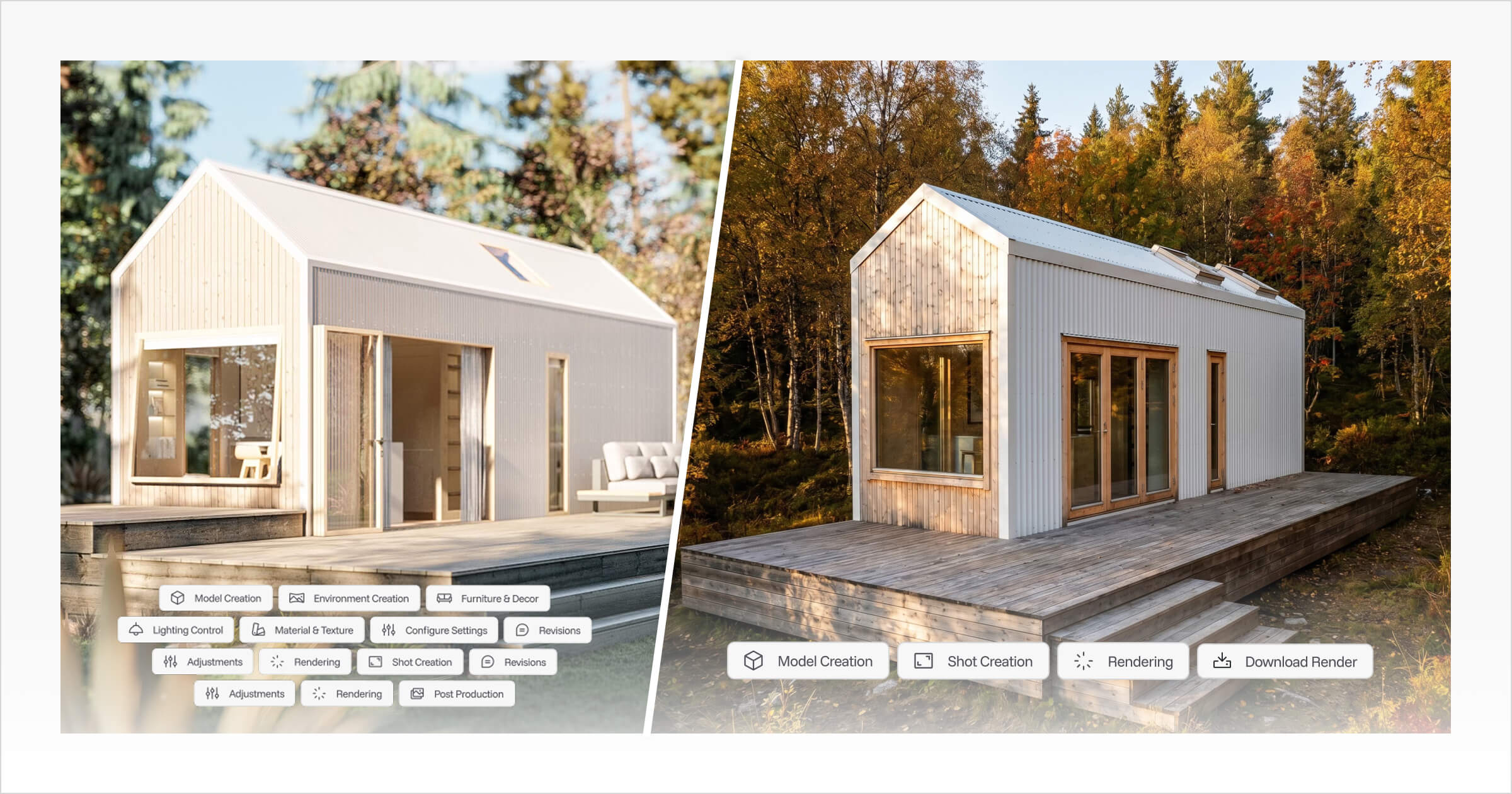
Within the Project workflow, the builder can use the submitted configuration to create photorealistic AI Renders.
For example, a customer who selected a particular cabin model, cladding, and roof finish could receive realistic exterior images showing those choices in a landscaped environment.
The builder can then bring together the customer's configuration, renders, specifications, pricing, and other relevant information in Proposal Builder.
This gives the sales team a way to continue from the initial inquiry into a more detailed customer presentation without losing the context of the original configuration.
Integrating With Other Sales Tools
Both platforms support integrations with external business systems.
IdeaRoom documents integrations with HubSpot, Zapier, and other services depending on the account and implementation.
Tiny Easy supports webhooks and CRM integrations, allowing configuration inquiries to be passed into a builder's existing sales systems.
If your business already uses a CRM, it's worth checking which customer details, configuration selections, and pricing information can be transferred.
The important question isn't simply whether an integration exists. It's whether your sales team can access the information it needs without manually recreating the inquiry.
How Each Platform Fits Into Your Building Sales Process
The 3D configurator is only one part of a building sale.
After exploring a design, customers may need revisions, additional visuals, a formal quote, or further consultation before making a purchasing decision.
Understanding how each platform supports these activities can help determine whether it fits your existing process.
A Typical Building Sales Scenario
Imagine a customer visits your website and explores one of your standard building models.
They select their preferred options, review the indicative price, and submit the configuration.
Your sales team now needs to review the inquiry, confirm the requirements, and guide the customer toward the next step.
How does that process work with each platform?
The Sales Workflow With IdeaRoom
For a business using IdeaRoom, a typical process might look like this:
Customer configuration: The customer selects a building and customizes its dimensions, materials, and options.
Lead capture: Their saved design and customer details become available through SalesView.
Sales follow-up: A salesperson reviews the configuration and discusses any required changes.
Quote or deal: The opportunity can progress through the supported quoting and sales stages.
Order and payment: Where enabled, the customer can complete checkout and the order is recorded in Sales Workspace.
Consider a shed manufacturer selling through a network of dealerships.
A customer could configure a shed online before discussing the design with a local dealer. The dealer can review the building, make adjustments, and continue the transaction using the relevant sales tools.
For this type of business, the configuration, pricing, and order stages are closely related.
The Sales Workflow With Tiny Easy
For a small-home builder using Tiny Easy, the process may involve additional design and presentation stages.
A typical workflow might look like this:
1. Customer Configuration
A prospective customer explores the builder's model range using the 3D Configurator.
They select their preferred home, customize the standard options, and submit their configuration.
2. Review the Lead and Create a Project
The builder receives the submitted design through Configurator Inbox.
Customer information, chosen options, pricing context, and qualifying answers are available for review.
Once the builder has followed up with the customer, they can create a Project from the submitted lead.
This keeps the original configuration connected with the work needed to progress the opportunity.
3. Further Design Changes
Sometimes a customer wants to go beyond the standard configuration options.
They may want to change the internal layout, adjust the cabinetry, or explore a different window arrangement.
With Tiny Easy's separate 3D Designer, builders can create or customize a design using their existing templates or a new design.
This gives the builder more freedom than the controlled options available in the customer-facing configurator.
The precise process for transferring a configuration into editable design work should be confirmed for the models and subscriptions involved.
4. Generate Realistic Renders
Using the submitted configuration or a design created in 3D Designer, the builder can generate photorealistic AI Renders.
These can show the customer's selected home with realistic materials, lighting, landscaping, and interior finishes.
For customers who find it difficult to interpret floor plans or basic 3D models, this can help communicate the design more clearly.
5. Prepare a Proposal
The builder can then use Tiny Easy's Proposal Builder to assemble a professional customer-facing proposal.
A proposal may include:
A project introduction
Floor plans and design information
Exterior and interior renders
Interactive 3D views
Specifications and inclusions
Pricing and quote information
Terms and next steps
Because the proposal can draw on the customer's configuration, project information, and renders, the builder has a practical starting point rather than assembling every element from scratch.
Reusable templates allow the business to maintain a consistent structure while tailoring the details to each customer.
The final proposal can be shared through a web link, with sent versions retained separately from later revisions.
6. Progress Toward a Sale
Once the customer has reviewed the proposal, the builder can continue discussions, confirm the final scope, and arrange the required contract and deposit.
The payment arrangement can then follow the builder's usual process, including any agreed progress payments and final balance.
Which Workflow Makes More Sense?
IdeaRoom's documented workflow is particularly relevant when the customer configuration leads directly into product pricing, dealer follow-up, contracts, and orders.
Tiny Easy's workflow is particularly relevant when the initial configuration leads into further design discussions, visualization, and tailored proposals.
For example, a business selling standardized garages may not need to produce several rounds of interior renders before confirming an order.
On the other hand, an ADU builder may regularly need to explore layout changes, present realistic visuals, and prepare a detailed proposal before the customer is ready to proceed.
The value of each platform depends on how well its tools support the work your team repeats for every customer.
IdeaRoom vs Tiny Easy Pricing
Both platforms use subscription-based pricing, but their pricing structures are different.
IdeaRoom provides customized quotes based on the business and service requirements. Tiny Easy publishes subscription plans for its individual modules.
The most useful comparison is the total cost of the workflow your business needs.
Pricing Comparison
Pricing | IdeaRoom | Tiny Easy |
|---|---|---|
Pricing model | Custom quote | Published module subscriptions |
Initial setup | Setup investment may apply; dealer arrangements vary | Managed setup for included Configurator models |
Configurator starting price | Contact IdeaRoom for pricing | US$245/month, billed monthly |
Annual billing | Depends on agreement | Discounted annual billing available |
Additional modules | Depends on service level and requirements | Separate 3D Designer, AI Renders and Proposal Builder subscriptions |
Usage allowances | Depends on agreement | Model, traffic and submission allowances vary by plan |
Integrations | Depends on service and implementation | Available on Configurator plans; implementation requirements vary |
Pricing information checked against official vendor pages on October 26, 2026. Prices are in USD where stated.
IdeaRoom Pricing
IdeaRoom's pricing depends on the type of business, product catalog, complexity, and required services.
According to its official pricing information, the typical arrangement involves an initial implementation investment followed by an ongoing subscription.
Supplier and dealer pricing structures can differ. Some dealer setups may not require the same upfront investment as a custom supplier implementation.
The final price may depend on the number and complexity of products, service level, customization requirements, and additional functionality.
Businesses need to contact IdeaRoom for a quote based on their requirements.
Tiny Easy Pricing
Tiny Easy offers separate subscription plans for its software modules.
As of October 2026, the starting monthly prices are:
Tiny Easy Module | Starting Price (USD/month) |
|---|---|
3D Configurator | $245 |
3D Designer | $89 |
AI Renders | $49 |
Proposal Builder | $25 |
These prices are based on monthly billing. Annual subscriptions are available at discounted rates.
3D Configurator Plans Designed to Grow With Your Business
Tiny Easy's 3D Configurator pricing is structured to accommodate businesses at different stages of growth.
Rather than requiring builders to launch their entire model range from day one, the plans allow businesses to start with a smaller selection and expand as their needs develop.
The Starter plan begins at $245/month and includes:
Two managed building models
500 traffic visits
15 customer submissions per month
Analytics and integrations
Managed configurator setup
This plan is designed for builders who want to introduce a 3D Configurator without committing to their entire building range upfront.
For example, a tiny home builder with eight standard models could begin by showcasing two of its most popular designs.
This gives the business an opportunity to introduce the configurator to customers, understand how they interact with the available options, and test how the inquiries fit into its sales process.
The Starter plan is also suitable for newer builders who are still developing their model range, or smaller businesses that only offer a handful of standard designs.
As the business grows, Tiny Easy offers larger plans with additional managed models, traffic allowances, and customer submissions.
This means builders can expand their configurator alongside their product range rather than investing in a larger setup before they need it.
Additional Modules
Builders can also choose which other Tiny Easy modules support their sales process.
For example, a builder wanting website configuration and lead capture may only need the 3D Configurator.
A business that also develops custom designs, prepares renders, and sends branded proposals may benefit from additional modules.
These modules are subscribed to separately, allowing businesses to select the tools they need at each stage.
For the latest plan details, see Tiny Easy Pricing.
Which Platform Offers Better Value?
Comparing subscription prices only makes sense when the underlying requirements are similar.
Before requesting a quote or selecting a plan, consider:
How many building models you want to offer.
How complex your product options and pricing rules are.
Whether you operate through a dealer network.
How many inquiries your configurator is expected to generate.
Whether customers need online checkout.
Whether your team needs additional design, rendering, or proposal tools.
What integrations and setup services are required.
For smaller builders, the ability to begin with a limited model range can make the initial investment more manageable.
For larger manufacturers with complex catalogs and dealer networks, implementation requirements and specialized sales features may carry more weight.
The better-value option is the one that supports your required workflow at a reasonable total cost, not necessarily the one with the lowest advertised entry price.
Which Should You Choose: IdeaRoom or Tiny Easy?
After comparing their features, pricing, and sales workflows, the decision comes down to the products you sell and how your business works with customers.
Both platforms can help customers explore buildings online, but their strengths become more apparent when you consider the process beyond the configuration itself.
Consider IdeaRoom If...
IdeaRoom may be a better fit if your business:
Primarily sells sheds, carports, garages, post-frame buildings, or red iron structures.
Requires detailed structural and dimensional configuration options.
Operates through suppliers, dealers, or multiple sales locations.
Needs building pricing, quoting, order management, and supported checkout functionality.
Wants to manage sales opportunities and transactions through SalesView.
Its specialization in structural buildings and associated sales workflows makes it particularly relevant to manufacturers selling configurable products through established catalogs and dealer networks.
Consider Tiny Easy If...
Tiny Easy may be a better fit if your business:
Sells ADUs, cabins, tiny homes, or prefab and modular homes.
Offers a standard model range with customizable layouts, finishes, and upgrades.
Wants customers to explore designs and pricing on its website before making an inquiry.
Needs to capture qualified leads with the customer's selected design and options.
Frequently handles design changes or personalized customer requests.
Uses realistic renders to help customers visualize their future homes.
Wants to prepare branded proposals using designs, renders, specifications, and pricing.
Would benefit from keeping customer configurations, designs, renders, and proposals connected through Projects.
Wants to start with a smaller model range and expand its configurator as the business grows.
For builders whose sales process involves guiding customers from an initial home configuration into a more personalized design and proposal, Tiny Easy provides tools specifically developed around those activities.
Questions to Ask Before Choosing
Before committing to either platform, consider these questions:
Does the configurator support your actual product range? Test one of your standard models with the options customers most frequently request.
How will your team manage updates? Understand what happens when you introduce new models, change pricing, or adjust the available options.
What happens after an inquiry? Follow a submitted configuration through the exact steps your sales team uses.
Which additional tools will you need? Consider quoting, CRM integration, design revisions, rendering, proposals, and checkout.
What is the total cost of implementation? Compare setup, ongoing subscriptions, plan limits, and any additional services.
Where possible, ask both providers to demonstrate your own use case rather than relying entirely on a generic product demonstration.
Final Thoughts: Choosing the Right 3D Building Configurator
IdeaRoom and Tiny Easy approach building configuration from different industry perspectives.
IdeaRoom offers specialized configurator and sales tools for sheds, carports, and structural buildings, with a strong connection between product configuration, pricing, and order management.
Tiny Easy focuses on small-home builders who want customers to explore their model range in 3D, make informed choices, and continue into a more detailed sales and design process.
The difference becomes especially important after the initial inquiry.
For builders selling ADUs, tiny homes, cabins, and prefab homes, the sale often involves more than selecting a model and confirming a price. Customers may want to explore design changes, understand how their home will look, and review a detailed proposal before committing to a contract and deposit.
Having the initial configuration connected to customer Projects, renders, and proposals gives builders a clearer way to manage those conversations and present the information customers need to make a decision.
If you're looking to introduce a 3D Configurator to your small-home business and connect it with your design, rendering, and proposal process, book a Tiny Easy demo to explore how the platform could work with your existing home range and sales process.



About the Author
Eujenne | Co-founder of Tiny Easy and has 8+ years of experience in the tiny house and small home industry.
She built her own tiny home on wheels with her partner and co-founder Laurin, and has designed several popular Tiny Easy concept homes, including the Scandi, Petite Maison, and 10x10 Tiny House on Wheels. At Tiny Easy, Eujenne works across UI/UX, product education, content marketing, and builder resources, helping small home businesses use 3D design and visual sales tools to improve their design, sales, and client communication workflows.